Best AI Photo Restoration Tools 2025
The Magic of AI Photo Restoration
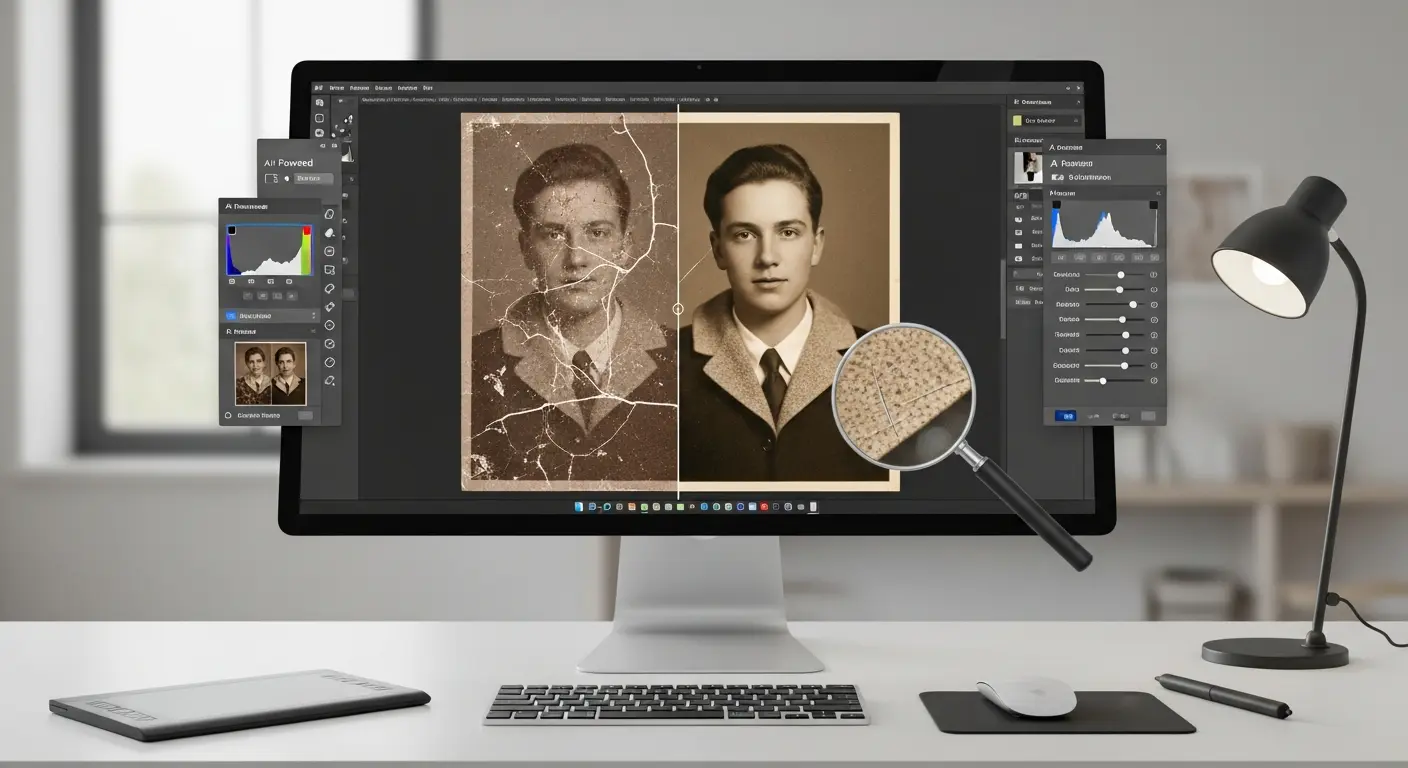
Old family photos tell irreplaceable stories, but time takes its toll—fading colors, scratches, tears, and damage can make precious memories nearly unrecognizable. AI photo restoration technology has revolutionized how we preserve these memories, transforming damaged century-old photographs into vibrant, clear images in minutes rather than the days or weeks traditional restoration required.
Impact Reality: Professional photo restoration that cost $50-300 per photo and took 1-2 weeks now costs $0-20 and takes 2-5 minutes with AI tools.
What is AI Photo Restoration?
AI photo restoration uses deep learning algorithms trained on millions of images to:
- Automatically detect and repair scratches, tears, and damage
- Colorize black and white photos realistically
- Enhance image clarity and resolution
- Remove noise and artifacts from old scans
- Reconstruct missing portions of damaged photos
- Restore faded colors to original vibrancy
The AI analyzes surrounding image context to intelligently fill damaged areas, predict original colors, and enhance details that have degraded over time.
Top AI Photo Restoration Tools
1. Remini
Price: Free with watermark | Premium at $4.99/week
Mobile-first AI photo enhancer that specializes in face restoration and overall image quality improvement.
Capabilities:
- Face enhancement and detail recovery
- Old photo restoration
- Blurry photo sharpening
- Low-resolution image upscaling
- Scratch and damage removal
Best For: Quick mobile restorations, face-focused photos, social media sharing Standout Feature: Exceptional face detail enhancement—can restore clarity to extremely pixelated faces
User Review: "Restored my grandmother's wedding photo from 1952. The difference is stunning—brought her face to life!" - Maria, 5-star rating
2. MyHeritage Photo Enhancer
Price: Free (14-day trial) | Complete at $129/year
Specialized in historical family photo restoration with impressive colorization capabilities.
Features:
- AI colorization of black & white photos
- Photo enhancement and repair
- Photo animation (Deep Nostalgia feature)
- Batch processing
- High-resolution downloads
Best For: Family historians, genealogy enthusiasts, heritage preservation Standout Feature: Deep Nostalgia—animates faces in old photos (creates short video clips)
3. Photomyne
Price: Free tier | Premium at $4.99/month
Combines photo scanning with AI restoration, perfect for digitizing physical photo albums.
Capabilities:
- Smart scan from phone camera
- Automatic photo detection and cropping
- AI restoration and enhancement
- Color restoration
- Cloud backup and organization
Best For: Digitizing large photo collections, family archiving projects
4. VanceAI Photo Restorer
Price: Free (3 credits) | Premium from $9.90/month
Web-based AI restoration platform with powerful repair capabilities.
Restoration Features:
- Scratch and damage removal
- Face restoration
- Colorization
- Denoising
- Sharpening
- Upscaling up to 800%
Best For: Serious restoration projects, professional use, high-resolution needs Standout Feature: Handles severely damaged photos effectively
5. Hotpot.ai Photo Restorer
Price: Free (limited) | Credits from $10
Simple, effective web-based restoration tool with no software installation required.
What It Does:
- One-click restoration
- Automatic scratch removal
- Color enhancement
- Face improvement
- Clarity boost
Best For: Beginners, quick restorations, occasional use Standout Feature: Extremely user-friendly—upload, click restore, download
6. Adobe Photoshop Neural Filters
Price: Included with Creative Cloud ($54.99/month)
Professional-grade AI restoration integrated into industry-standard editing software.
Neural Filter Capabilities:
- Skin smoothing and face restoration
- Colorize filter
- Super zoom (AI upscaling)
- Noise reduction
- JPEG artifact removal
Best For: Professional photographers, advanced users, commercial projects Standout Feature: Full manual control combined with AI assistance
7. Topaz Photo AI
Price: One-time purchase at $199
Premium desktop software for serious photo restoration and enhancement.
Advanced Features:
- AI-powered denoising
- Sharpening and detail recovery
- Upscaling up to 6x resolution
- Face recovery
- RAW photo enhancement
Best For: Professional restorers, print shops, photography businesses Standout Feature: Best-in-class upscaling—creates print-ready images from low-res sources
Restoration Types and Techniques
Damage Repair
Common issues AI fixes:
- Scratches and creases
- Tears and missing pieces
- Water damage stains
- Fading and discoloration
- Mold spots and deterioration
How AI works: Analyzes surrounding pixels to intelligently fill damaged areas, maintaining texture and pattern consistency.
Colorization
AI adds realistic color to black & white photos:
- Analyzes image content (skin, sky, grass, clothing)
- References millions of color photos for accuracy
- Applies contextual coloring (blue skies, green grass, realistic skin tones)
- Allows manual color adjustments
Accuracy: Modern AI achieves 80-90% color accuracy on well-preserved B&W photos.
Enhancement
Improving overall quality:
- Sharpening blurry images
- Increasing resolution (upscaling)
- Removing noise and grain
- Adjusting brightness and contrast
- Restoring faded colors
Face Restoration
Specialized facial improvement:
- Reconstructing facial details
- Removing blemishes and damage
- Enhancing eyes, nose, mouth clarity
- Age-appropriate skin texture
- Maintaining facial proportions
Best Practices for Optimal Results
Start with Quality Scans
Scanning tips:
- Use 600 DPI minimum (1200 DPI for very small photos)
- Scan in color even for B&W photos (captures subtle tones)
- Clean photos gently before scanning (soft brush, no liquids)
- Use flatbed scanner, not phone camera when possible
- Save as TIFF or high-quality PNG (not compressed JPEG)
Work from Copies
Always preserve originals:
- Never write on or alter physical originals
- Keep digital copies separate from originals
- Save restoration progress in non-destructive formats
- Maintain version history
Use Multiple Tools
Combine strengths:
- Tool A for damage repair
- Tool B for colorization
- Tool C for final enhancement
- Each AI has different strengths
Example workflow: Remini for face restoration → MyHeritage for colorization → Topaz for final sharpening
Adjust AI Results
AI provides 80-90% solution:
- Manually correct obvious errors
- Adjust colors to match known information
- Fine-tune restoration intensity
- Remove AI artifacts
Document Restoration Decisions
For historical accuracy:
- Note colorization choices
- Document original photo condition
- Keep both before/after versions
- Record restoration tool and settings used
Use Cases and Applications
Family History Preservation
Preserve legacy for future generations:
- Restore photos of ancestors
- Create digital family albums
- Share enhanced photos with relatives
- Print restored photos for display
Real Story: "I restored 50 years of family photos—from my great-grandparents to my childhood. Now they're organized digitally and I've printed beautiful albums for each family member. Priceless!" - James, Heritage Enthusiast
Professional Photography Services
Revenue opportunity:
- Offer restoration services ($30-100 per photo)
- Wedding photo restoration
- Memorial service photo enhancement
- Historical archive digitization
Business Model: $50/photo × 20 photos/week = $52,000/year additional revenue
Historical Research
Academic and institutional applications:
- Enhance historical documents
- Restore damaged archives
- Colorize historical photos for education
- Preserve cultural heritage
Real Estate and Property
Document historical properties:
- Restore old property photos
- Create before/after presentations
- Historical home documentation
- Heritage property marketing
Cost Comparison: AI vs Traditional Restoration
Traditional Professional Restoration
Per photo costs:
- Minor restoration: $50-100
- Moderate damage: $100-200
- Severe damage: $200-500
- Colorization: $100-300 additional
- Timeline: 1-3 weeks per photo
100 family photos: $10,000-30,000 + months of time
AI Restoration
Per photo costs:
- Basic tools: $0-5
- Premium tools: $1-20
- Professional software: $0.50-5 (amortized)
- Timeline: 2-10 minutes per photo
100 family photos: $50-500 + 5-15 hours of time
Savings: $9,500-29,500 (95%+ cost reduction)
Limitations and Considerations
What AI Can't Do (Yet)
Current limitations:
- Cannot recover information completely destroyed
- May hallucinate details (create non-existent features)
- Colorization is educated guessing (not 100% accurate)
- Struggles with very low resolution sources
- May not match specific historical color palettes exactly
When to Use Professional Restorers
Complex situations requiring human expertise:
- Extremely valuable historical photos
- Photos for legal/official purposes
- Complex damage requiring artistic judgment
- Need for guaranteed historical accuracy
- Photos for museum or archival standards
Hybrid approach: Use AI for 90% of work, hire professional for final 10% quality assurance.
Frequently Asked Questions
Q: Can AI restore extremely damaged photos? A: AI works remarkably well on photos with 50-80% damage. Beyond that, results vary. Very severe damage (>80% destroyed) may require professional restoration or be unrecoverable.
Q: Are colorized photos historically accurate? A: AI makes educated guesses based on context (sky=blue, grass=green). Accuracy is 80-90% for common elements. For historical accuracy, research actual colors when available.
Q: Will AI damage my original photos? A: No—all AI tools work on digital copies. Your physical and original digital files remain untouched. Always work from copies, never originals.
Q: Can I use restored photos commercially? A: If you own the original photo rights, yes. AI restoration doesn't change copyright ownership. For photos you don't own, get proper permissions.
Q: How do I know which tool to use? A: Start with free tools (Remini, Hotpot.ai). For family projects, try MyHeritage. For professional work, invest in Topaz Photo AI or Adobe.
Q: Can AI restore digital photos that are corrupted? A: AI restoration works on degraded image quality, not file corruption. For corrupted files, use data recovery tools first, then AI restoration.
Conclusion
AI photo restoration democratizes what was once an expensive, time-consuming professional service. Whether preserving family memories or running a restoration business, AI tools deliver professional-quality results at a fraction of traditional costs.
Your Action Plan:
- Today: Gather 5-10 old photos to restore
- This Week: Try 2-3 free tools (Remini, Hotpot.ai, MyHeritage trial)
- This Month: Restore your most important family photos
- Ongoing: Digitize and restore your entire photo collection
The photos sitting in your attic or storage boxes are deteriorating every day. AI makes it possible to preserve these irreplaceable memories before they're lost forever.
Start your photo restoration journey today—turn faded, damaged memories into vivid, lasting treasures.
Related Resources:
Tags:
Admin
Expert in AI tools and technologies. Passionate about helping others learn and master AI to boost their productivity.