Best AI Logo Design Generators 2026
Editorial note: Some links in this article are affiliate links — we may earn a commission if you sign up, at no extra cost to you. Every tool is independently tested by our team before being recommended. Read our editorial standards →
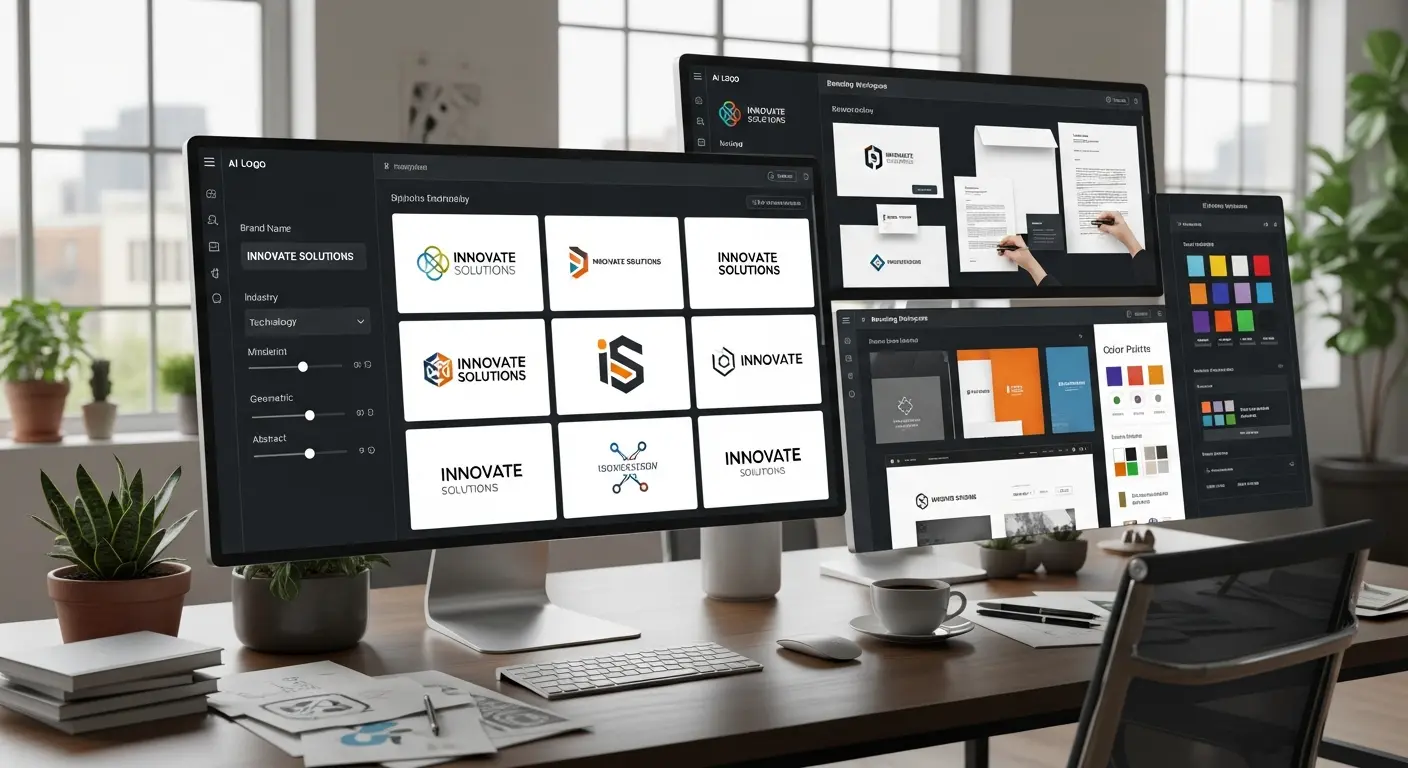
Logo generators are useful for getting early ideas on the screen quickly. They are less useful when a brand needs a distinctive system that works across packaging, typography, motion, and long-term product use.
This guide compares the tools as starting points for founders and small teams: how quickly they create usable directions, what control they offer, and where a designer’s input becomes worthwhile.
How AI Logo Generators Work
The AI Design Process
Modern AI logo generators follow a sophisticated workflow:
Step 1: Brand Input
- Company name and tagline
- Industry and business type
- Design preferences (colors, styles, symbols)
- Brand personality traits
Step 2: AI Generation
- Machine learning analyzes millions of professional logos
- Generates dozens of unique concepts matching your preferences
- Applies design principles (balance, hierarchy, contrast)
- Creates variations with different layouts and styles
Step 3: Customization
- Edit colors, fonts, layouts, and icons
- AI suggests complementary color palettes
- Preview logo on mockups (business cards, websites, products)
- Export in multiple file formats
Result: Professional logo designed to your specifications in 15-30 minutes vs 2-4 weeks with traditional designers.
Top AI Logo Design Generators
1. Looka (formerly Logojoy) - The Quality Leader
Price: Free to design | $20 for basic | $65 for premium package
Looka consistently produces the highest quality AI-generated logos with professional aesthetics and extensive customization options.
Best For: Small businesses, startups, entrepreneurs seeking professional quality Design Quality: ⭐⭐⭐⭐⭐ (5/5)
Key Features:
- AI generates 100+ logo concepts from your inputs
- Extensive customization (colors, fonts, layouts, symbols)
- Brand kit includes 300+ branded materials (business cards, social templates)
- Unlimited revisions and regenerations
- High-resolution files (PNG, SVG, vector)
- Color palette and font recommendations
- Preview mockups (website, products, signage)
Standout Feature: Brand Kit includes social media templates, business cards, and marketing materials using your logo—exceptional value.
Pricing Details:
- Basic ($20): Logo files only (PNG with transparent background, vector files)
- Premium ($65): Logo files + Brand Kit (300+ branded materials)
User Review: "Looka created a logo better than the $800 designer version we got previously. The brand kit saved us thousands on additional design work." - Maria, E-commerce Founder
2. Brandmark - AI-Powered Brand Identity
Price: $25 for basic | $65 for designer | $175 for enterprise
Brandmark goes beyond logos, creating complete brand identities with color schemes, typography, and brand guidelines.
Best For: Comprehensive brand identity, startups, rebranding projects Design Quality: ⭐⭐⭐⭐½ (4.5/5)
Key Features:
- AI generates logo with complete brand identity system
- Animated logo versions
- Social media assets (covers, profile pictures, ad templates)
- Business card designs
- Brand style guide
- Color palette psychology matching your industry
- Font pairing recommendations
Standout Feature: Animated logo versions perfect for video intros and digital marketing.
Pricing Details:
- Basic ($25): Logo files and basic brand colors
- Designer ($65): Full brand identity + social assets
- Enterprise ($175): Everything + animated logos + style guide
Designer's Take: "Brandmark's AI understands color psychology better than competing tools. The brand guidelines are remarkably professional." - Jason, Brand Consultant
3. LogoAI - Speed and Simplicity
Price: $29 for basic | $49 for premium
LogoAI focuses on speed and ease of use, generating quality logos in under 5 minutes with minimal input required.
Best For: Quick turnaround, solopreneurs, side projects, budget-conscious Design Quality: ⭐⭐⭐⭐ (4/5)
Key Features:
- Ultra-fast logo generation (under 5 minutes)
- Smart logo matching based on industry
- Business card and social media templates
- Multiple file formats (PNG, SVG, PDF)
- Unlimited revisions within editor
- Brand automation (automatically apply logo to templates)
Standout Feature: Fastest generation time—from zero to finished logo in 5 minutes.
Budget Pick: At $29, LogoAI offers excellent value for simple, professional logos without extensive brand packages.
4. Tailor Brands - All-in-One Business Branding
Price: $3.99/month (annual) or $9.99/month
Tailor Brands combines AI logo design with additional business tools like website builders and social media design tools.
Best For: New businesses needing logo + website + social presence Design Quality: ⭐⭐⭐⭐ (4/5)
Key Features:
- AI logo generator with industry-specific designs
- Drag-and-drop website builder
- Social media post designer
- Branded presentations
- Business card designs
- Merchandise mockups
- Monthly social media template updates
Standout Feature: Subscription model includes website builder and ongoing social media templates—great for businesses just starting out.
Value Proposition: $48/year for logo + website + ongoing design assets beats separate tools costing $200+/year.
5. Hatchful by Shopify - Free for E-commerce
Price: 100% Free
Hatchful offers completely free AI logo generation, perfect for bootstrapped startups and testing business ideas.
Best For: Budget-conscious entrepreneurs, e-commerce stores, quick prototypes Design Quality: ⭐⭐⭐½ (3.5/5)
Key Features:
- Completely free logo generation
- Industry-specific templates
- Multiple style options
- High-resolution downloads
- Basic business card templates
- Optimized for e-commerce platforms
Standout Feature: Free with no watermarks or limitations—unbeatable for testing business concepts.
Limitation: Fewer customization options and simpler designs compared to paid tools, but excellent for getting started.
Perfect For: "I used Hatchful to create a logo for my Shopify store in 10 minutes. Saved hundreds while testing my business idea." - Tom, E-commerce Entrepreneur
Detailed Feature Comparison
| Feature | Looka | Brandmark | LogoAI | Tailor Brands | Hatchful |
|---|---|---|---|---|---|
| Price | $20-65 | $25-175 | $29-49 | $48/year | Free |
| Quality | ⭐⭐⭐⭐⭐ | ⭐⭐⭐⭐½ | ⭐⭐⭐⭐ | ⭐⭐⭐⭐ | ⭐⭐⭐½ |
| Generation Speed | 2-3 min | 3-5 min | <5 min | 2-3 min | <2 min |
| Concepts Generated | 100+ | 50+ | 30+ | 50+ | 20+ |
| Customization | Extensive | Extensive | Moderate | Moderate | Basic |
| Brand Kit | ✅ (300+) | ✅ | ✅ | ✅ | Basic |
| Vector Files | ✅ | ✅ | ✅ | ✅ | ✅ |
| Animated Logos | ❌ | ✅ | ❌ | ❌ | ❌ |
| Website Builder | ❌ | ❌ | ❌ | ✅ | ❌ |
| Best For | Quality | Identity | Speed | All-in-one | Free |
Choosing the Right AI Logo Generator
By Business Stage
Just Testing an Idea:
- Best: Hatchful (free) or LogoAI ($29)
- Why: No financial commitment while validating your concept
Launching a Business:
- Best: Looka Premium ($65) or Brandmark Designer ($65)
- Why: Professional quality with complete brand identity system
Rebranding Existing Business:
- Best: Brandmark Enterprise ($175) or Looka Premium ($65)
- Why: Comprehensive brand guidelines ensure consistency across all materials
Need Logo + Website:
- Best: Tailor Brands ($48/year)
- Why: Bundled solution costs less than separate logo and website tools
By Budget
$0 Budget:
- Only Option: Hatchful by Shopify
- Quality: Good enough for testing and bootstrapping
$20-30 Budget:
- Best Value: Looka Basic ($20) or LogoAI Basic ($29)
- What You Get: Professional logo files, basic brand colors
$50-75 Budget:
- Best Investment: Looka Premium ($65) or Brandmark Designer ($65)
- What You Get: Logo + complete brand identity + marketing materials
Unlimited Budget:
- Best Result: Brandmark Enterprise ($175)
- What You Get: Everything including animated logos and comprehensive style guide
Using AI Logo Generators Effectively
Preparation for Better Results
Before you start:
- Research competitor logos in your industry
- Identify 3-5 brands whose logos you admire (any industry)
- Define your brand personality in 5-7 adjectives
- Choose 2-3 preferred colors (or let AI suggest)
- List any symbols/icons relevant to your business
Preparation Time: 15-20 minutes Impact on Results: 50% better logo quality with clear inputs
The Design Process
Step-by-Step Workflow:
-
Input Phase (5 min):
- Enter company name and tagline
- Select industry and business type
- Choose design preferences
-
Generation Phase (2-3 min):
- AI creates 30-100+ concepts
- Review all options before customizing
- Save favorites for comparison
-
Customization Phase (10-15 min):
- Edit top 3-5 logos
- Adjust colors to brand palette
- Modify fonts for readability
- Resize and reposition elements
- Test on mockups
-
Finalization (5 min):
- Preview on business cards, websites, products
- Ensure legibility at small sizes
- Check color versatility (black/white versions)
- Download all file formats
Total Time: 25-30 minutes from start to finished logo
Common Mistakes to Avoid
Choosing complexity over simplicity: The best logos work at thumbnail size. If your logo has too many details, simplify.
Following trends over timelessness: Trendy gradients and effects date quickly. Classic, simple designs last decades.
Ignoring versatility: Your logo must work in black and white, on dark backgrounds, and at tiny sizes.
Skipping the mockup test: Always preview your logo on business cards, websites, and products before finalizing.
Not getting feedback: Show your top 3 options to 5-10 people in your target audience before deciding.
Legal and Trademark Considerations
Can You Trademark an AI-Generated Logo?
Yes, but with considerations:
Ownership: Most AI logo generators grant you full commercial rights to logos you purchase. Check terms of service to confirm.
Uniqueness: AI-generated logos are unique enough for trademark registration in most cases, but search USPTO database first.
Registration Process:
- Search existing trademarks at USPTO.gov
- File trademark application (DIY $250-350 or lawyer $500-2,000)
- Wait 8-12 months for approval
Professional Recommendation: Invest $500-1,000 in trademark attorney consultation for businesses serious about brand protection.
Ensuring Design Uniqueness
Before finalizing:
- Google image search your logo design
- Check competitors in your industry
- Search trademark databases
- Ask for AI-generated variations if too similar to existing logos
Peace of Mind: Most AI logo tools generate sufficiently unique designs, but verification takes 15 minutes and prevents future legal headaches.
Beyond the Logo: Complete Brand Identity
Building Consistency
Once you have your logo, create comprehensive brand guidelines:
Color Palette:
- Primary brand colors (2-3)
- Secondary colors (2-3)
- Hex codes for digital, CMYK for print
Typography:
- Primary font (headlines, logos)
- Secondary font (body text)
- Font sizes and hierarchy
Logo Usage:
- Minimum size requirements
- Clear space guidelines
- Acceptable color variations
- Unacceptable modifications
Brand Voice:
- Tone (professional, friendly, authoritative)
- Key messaging points
- Do's and don'ts
Extending Your Brand
Use your logo consistently across:
- Website and email signatures
- Social media profiles and posts
- Business cards and letterhead
- Product packaging and labels
- Marketing materials and ads
- Signage and merchandise
Brand Recognition Stat: Consistent brand presentation increases revenue by average of 23% (Forbes).
Frequently Asked Questions
Q: Are AI-generated logos unique enough for commercial use? A: Yes. Quality AI logo generators create unique combinations of elements, making exact duplicates extremely unlikely. However, always search for similar logos in your industry and file for trademark protection if building a serious brand.
Q: Can I edit my AI-generated logo later? A: Yes, if you download vector files (SVG, AI). Vector formats allow infinite editing and scaling. Some platforms charge extra for vector files—Looka and Brandmark include them.
Q: Do AI logo generators offer refunds if I'm not satisfied? A: Policies vary. Looka and Brandmark allow unlimited regeneration and editing before purchase. Most offer 30-60 day satisfaction guarantees. Check specific refund policies before buying.
Q: How do AI logos compare to professional designers? A: For 80% of small businesses, AI logos provide 90% of the quality at 5% of the cost. Professional designers excel at highly custom, conceptual work. For standard business logos, AI is often indistinguishable from human-designed work.
Q: What file formats do I need? A: Essential formats:
- PNG (transparent background) for websites
- SVG or AI/EPS (vector) for scaling and editing
- JPG for certain printing applications Most premium packages include all formats.
Real User Success Stories
Case Study: E-commerce Startup "We used Looka to create our logo ($65) instead of the $2,000 designer quote. The brand kit included everything we needed to launch. We've since grown to $500K revenue and still use the AI-generated logo." - Amanda, Fashion E-commerce
Case Study: Law Firm Rebrand "Skeptical about AI for professional services, we tried Brandmark. The results were sophisticated and captured our traditional-yet-modern positioning perfectly. Total cost: $175 vs $5,000+ we budgeted." - Robert, Partner at Law Firm
Case Study: Restaurant Logo "Hatchful's free logo generator gave us a professional-looking brand while bootstrapping our restaurant. Once profitable, we upgraded to Looka for a more custom design. AI saved us thousands at critical cash-constrained stages." - Carlos, Restaurant Owner
Conclusion
AI logo generators have democratized professional branding, making high-quality logo design accessible to every entrepreneur and small business. Whether you're bootstrapping with Hatchful's free tool or investing in Brandmark's comprehensive brand identity, AI can deliver professional results in minutes that previously required weeks and thousands of dollars.
Your Action Plan:
- Today: Try 2-3 free logo generators (Hatchful + free trials of Looka/Brandmark)
- This Week: Gather feedback on top 3 designs from target customers
- By Month End: Purchase final logo and create brand guidelines
- Ongoing: Apply logo consistently across all brand touchpoints
The businesses thriving in 2026 aren't spending $5,000 on logos—they're investing AI-saved budget into product development, marketing, and customer acquisition while still maintaining professional brand identities.
Ready to create your professional logo in 30 minutes? Choose your AI logo generator and start building your brand today.
External Resources:
Tags
Written by

Sourabh Gupta
Founder & Data Scientist, AI Tools Specialist · 2+ years in AI/ML
Sourabh tests every AI tool he writes about — hands-on, with real use cases. His background in data science means he goes beyond marketing claims to benchmark actual performance, cost, and reliability for developers and creators.
Full bio & editorial process →