Best AI Coding Assistants 2025: Write Code 3x Faster with AI

The AI Coding Revolution
AI coding assistants have transformed software development, enabling developers to write code 3x faster while reducing bugs and learning new languages more quickly. According to GitHub, developers using AI coding tools complete tasks 55% faster than those without AI assistance.
In 2025, AI coding assistants have evolved from simple autocomplete to intelligent pair programming partners that understand context, suggest entire functions, and explain complex code. Whether you're a beginner learning to code or an experienced developer, AI coding tools can dramatically boost your productivity.
Top AI Coding Assistants Compared
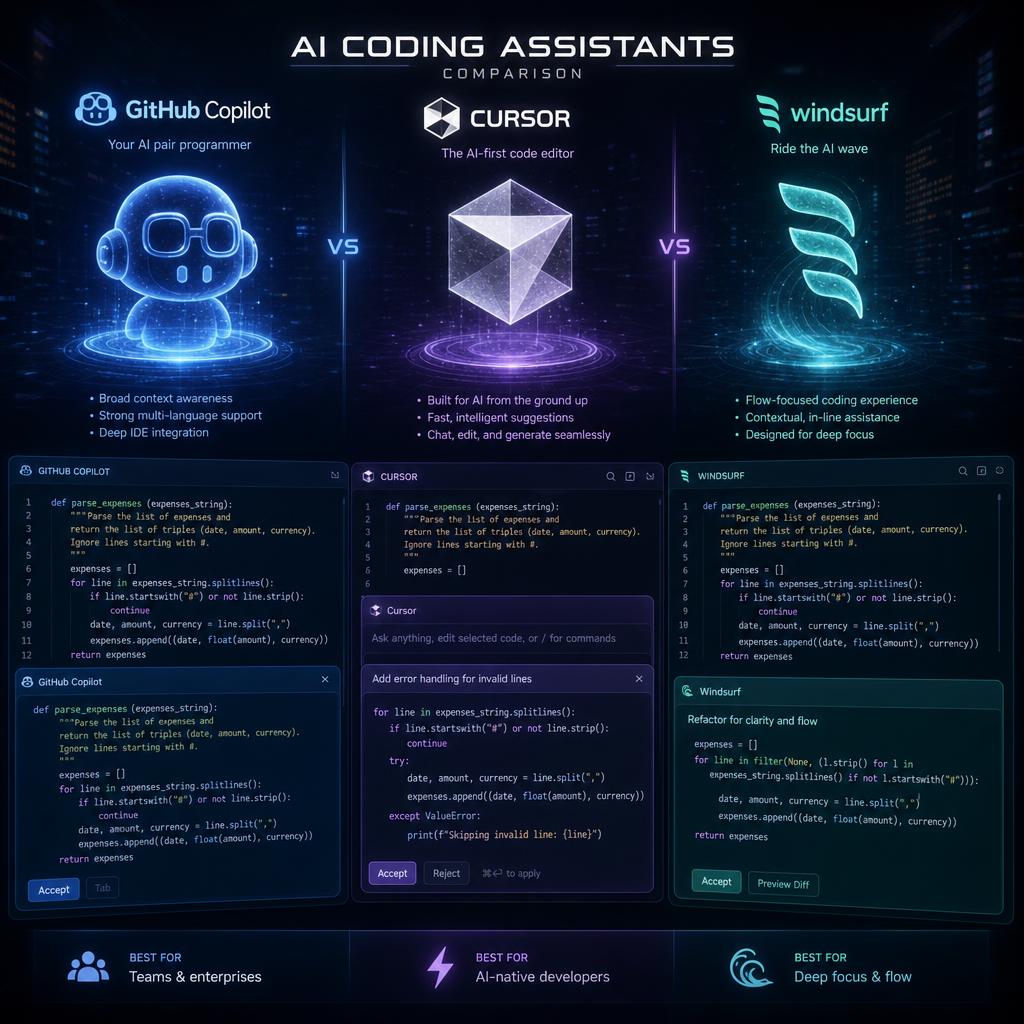
1. GitHub Copilot
Price: $10/month (Individual) | $19/month (Business) | Free for students/teachers
Microsoft and OpenAI's AI pair programmer, now powered by GPT-4, integrates seamlessly into VS Code and other IDEs.
Key Features:
- Context-aware code suggestions
- Entire function generation
- Multiple language support (JavaScript, Python, TypeScript, Ruby, Go, and 70+ more)
- Comment-to-code generation
- Test case generation
- Code explanation and documentation
- VS Code, JetBrains, Neovim integration
Best For: Professional developers, teams, multi-language projects
Productivity Gain: Complete tasks 55% faster (GitHub study)
Pro Tip: Write detailed comments describing what you want, then let Copilot generate the implementation.
Learn more about AI tools in our guide to AI web development tools.
2. Cursor
Price: Free | Pro at $20/month
AI-first code editor built from the ground up for AI-assisted development. Fork of VS Code with deep AI integration.
Key Features:
- Chat with your codebase (ask questions about any code)
- CMD+K for inline AI edits
- Multi-file editing with AI
- Automatic bug detection and fixes
- Codebase-wide understanding
- Privacy mode (code doesn't leave your machine)
- Terminal integration
Best For: Developers wanting AI-first editing experience, refactoring large codebases
Unique Advantage: Understands entire project context, not just current file
External Resource: Cursor Official Website
3. Tabnine
Price: Free | Pro at $12/month | Enterprise custom pricing
Privacy-focused AI coding assistant that can run locally on your machine.
Key Features:
- Local AI model option (code never leaves your computer)
- Team learning (learns from your codebase)
- Supports 80+ programming languages
- IDE-agnostic (works with VS Code, IntelliJ, PyCharm, etc.)
- Whole-line and full-function completion
- Natural language to code
- Customizable for enterprise
Best For: Security-conscious teams, enterprises with code privacy requirements
Privacy Advantage: Only AI assistant offering fully local processing
4. Codeium
Price: Free for individuals | Team and Enterprise plans available
Fast, unlimited AI code completion with generous free tier.
Key Features:
- Unlimited completions (free tier)
- 70+ language support
- Autocomplete across multiple lines
- Natural language search across codebase
- Explain code feature
- Generate unit tests
- Fast response times (< 100ms latency)
Best For: Individual developers, budget-conscious teams, students
Standout Feature: Completely free unlimited usage for individuals
5. Amazon CodeWhisperer
Price: Free for individuals | Professional $19/month
AWS's AI coding companion with built-in security scanning.
Key Features:
- Code suggestions with AI
- Security vulnerability scanning
- Reference tracking (shows if code matches public repos)
- AWS service integration guidance
- Bias avoidance
- Supports 15+ languages
- IDE integration (VS Code, JetBrains, AWS Cloud9)
Best For: AWS developers, teams focused on security, cloud development
Unique Feature: Built-in security and compliance scanning
6. Replit Ghostwriter
Price: Free tier | Replit Core $25/month (includes Ghostwriter)
AI assistant integrated into Replit's browser-based IDE.
Key Features:
- Code completion and generation
- Explain code
- Transform code (refactor, optimize)
- Generate code from comments
- Chat with AI about your code
- Works in browser (no installation)
- Collaborative coding with AI
Best For: Beginners, students, quick prototyping, learning to code
Education Advantage: Perfect for learning with immediate AI guidance
How AI Coding Assistants Work
Context Understanding
Modern AI coding assistants analyze:
- Current file content and structure
- Related files in your project
- Comments and function names
- Import statements and dependencies
- Your coding patterns and style
- Programming language syntax and conventions
Suggestion Quality Factors
Better suggestions come from:
- Clear, descriptive function/variable names
- Detailed comments explaining intent
- Consistent code structure
- Well-organized project files
- Good existing code examples in codebase
Example - Improving AI Suggestions:
❌ Vague comment:
// get data
✅ Clear comment:
// Fetch user profile data from API endpoint /api/users/:id
// Returns user object with name, email, and preferences
// Handles errors with try-catch and logs to console
The second comment generates much more accurate, complete code.
Practical Use Cases
1. Learning New Languages/Frameworks
AI assistants accelerate learning by:
- Showing syntax for new languages
- Suggesting framework-specific patterns
- Explaining unfamiliar code
- Providing examples in real-time
- Teaching best practices through suggestions
Time Saved: Reduce new framework learning curve by 40-60%
2. Boilerplate Code Generation
Generate repetitive code instantly:
- API endpoint handlers
- Database models and schemas
- Test suite scaffolding
- Configuration files
- CRUD operations
- Form validation
Time Saved: 5-10 hours per week on boilerplate
3. Debugging and Error Fixing
AI helps identify and fix issues:
- Suggest fixes for error messages
- Identify logic errors
- Recommend optimizations
- Find security vulnerabilities
- Detect code smells
Time Saved: 30-50% faster debugging
4. Documentation and Comments
Automatically generate:
- Function documentation
- Inline code comments
- README files
- API documentation
- Code explanations
Time Saved: 2-4 hours per week on documentation
5. Code Refactoring
AI assists with:
- Modernizing legacy code
- Improving code structure
- Applying design patterns
- Optimizing performance
- Converting between languages
Developer Workflow Integration
VS Code Setup (Most Popular)
- Install AI extension (Copilot, Cursor, Tabnine)
- Configure keybindings for quick access
- Adjust suggestion triggers to your preference
- Enable inline suggestions
- Set up language-specific settings
Recommended Extensions Combo:
- GitHub Copilot (primary AI)
- ESLint (code quality)
- Prettier (formatting)
- GitLens (version control context)
JetBrains IDEs Setup
JetBrains (PyCharm, IntelliJ, WebStorm) support:
- GitHub Copilot plugin
- Tabnine plugin
- Amazon CodeWhisperer
- Built-in AI features (coming 2025)
Command Line Integration
Some AI assistants work in terminal:
- GitHub Copilot CLI (command suggestions)
- Warp terminal (AI command search)
- Fig (autocomplete for terminal)
Best Practices for AI Coding Assistants
Do's
✅ Review all AI-generated code before committing ✅ Use AI to explore multiple implementation approaches ✅ Write clear comments to guide AI suggestions ✅ Test AI-generated code thoroughly ✅ Learn from AI suggestions to improve your skills ✅ Provide feedback to improve suggestions
Don'ts
❌ Blindly accept suggestions without understanding ❌ Skip testing AI-generated code ❌ Use AI as a replacement for learning fundamentals ❌ Commit code you don't understand ❌ Ignore security implications of suggestions ❌ Expect perfect code on first generation
Performance Comparison
| Tool | Speed | Accuracy | Context Awareness | Price (Individual) |
|---|---|---|---|---|
| GitHub Copilot | ⭐⭐⭐⭐ | ⭐⭐⭐⭐⭐ | ⭐⭐⭐⭐ | $10/mo |
| Cursor | ⭐⭐⭐⭐⭐ | ⭐⭐⭐⭐ | ⭐⭐⭐⭐⭐ | $20/mo |
| Tabnine | ⭐⭐⭐⭐ | ⭐⭐⭐⭐ | ⭐⭐⭐ | $12/mo |
| Codeium | ⭐⭐⭐⭐⭐ | ⭐⭐⭐⭐ | ⭐⭐⭐ | Free |
| CodeWhisperer | ⭐⭐⭐ | ⭐⭐⭐⭐ | ⭐⭐⭐ | Free |
| Ghostwriter | ⭐⭐⭐ | ⭐⭐⭐ | ⭐⭐⭐ | $25/mo (w/ Replit) |
Privacy and Security Considerations
Code Privacy
Questions to ask:
- Is my code sent to external servers?
- Can I use local AI models?
- Is my code used for AI training?
- What data is stored and for how long?
- Does the tool comply with enterprise security requirements?
Privacy Rankings (Most to Least Private):
- Tabnine (local mode)
- Cursor (privacy mode)
- Codeium (no telemetry option)
- CodeWhisperer
- GitHub Copilot
Enterprise Considerations
For enterprise use, ensure:
- ✅ Compliance with corporate policies
- ✅ Data residency requirements met
- ✅ Audit logging available
- ✅ Admin controls for team management
- ✅ SSO/SAML integration
- ✅ Code exclusion options
Frequently Asked Questions
Q: Will AI coding assistants replace developers? A: No. AI assistants are tools that enhance productivity, not replacements. They handle repetitive tasks, allowing developers to focus on architecture, business logic, and creative problem-solving.
Q: Do I need to be an experienced developer to use AI coding tools? A: No, but understanding programming fundamentals helps you evaluate and modify AI suggestions. Beginners can learn faster with AI assistance.
Q: Can I trust AI-generated code in production? A: Always review, test, and understand AI code before production deployment. Treat AI suggestions like code review from a junior developer—helpful but requiring verification.
Q: Which AI coding assistant is best for beginners? A: Codeium (free and unlimited) or Replit Ghostwriter (great learning environment). Both provide good suggestions without cost barriers.
Q: Do AI assistants work offline? A: Tabnine offers offline mode with local models. Most others require internet connection for cloud-based AI processing.
Future of AI-Assisted Development
Emerging Trends
Multi-Agent Development: AI assistants will coordinate with each other—one for code, one for tests, one for documentation.
Project-Level Understanding: Future AI will understand entire codebases, architectural decisions, and business context.
Voice-Activated Coding: Speak your intent and watch AI write the implementation.
Automated Code Review: AI will review pull requests, suggest improvements, and check for bugs automatically.
Conclusion
AI coding assistants have evolved from experimental autocomplete to essential development tools in 2025. Whether you're learning to code, building production applications, or maintaining large codebases, AI assistants can significantly boost your productivity and code quality.
Getting Started:
- This Week: Install Codeium (free) or GitHub Copilot (10-day trial)
- This Month: Use AI for at least 50% of coding tasks
- Quarter 2: Measure productivity gains and adjust tools
- Long-term: Make AI assistance core to your development workflow
The developers thriving in 2025 aren't avoiding AI—they're mastering it to code faster, learn quicker, and focus on higher-value problem-solving.
Ready to write code 3x faster? Install your first AI coding assistant today and experience the future of development.
External Resource: GitHub Copilot Research
Tags:
Admin
Expert in AI tools and technologies. Passionate about helping others learn and master AI to boost their productivity.