Autonomous Browser Agents (2026): Stagehand vs. Browser-Use vs. Playwright LLM Harnesses

Author at Teach AI Tools
1. The Maintenance Crisis of Deterministic Web Automation
For more than a decade, web automation relied entirely on deterministic rule sets: XPath locators, CSS class hierarchies, and static HTML element IDs. In modern Single Page Applications (SPAs) built with React, Next.js, Vue, and utility-first CSS frameworks like Tailwind, class names are dynamically hashed (e.g., class="css-1a2b3c btn_variant_3"), DOM trees re-render on asynchronous client state transitions, and component encapsulation creates Shadow DOM boundaries.
The operational maintenance overhead of legacy end-to-end testing and web scraping scripts has reached unsustainable levels. A minor UI refactor or A/B experiment causes automated regression suites to break repeatedly.
Autonomous Browser Agents fundamentally resolve this by shifting from procedural code execution to goal-driven semantic agency. Instead of instructing a test runner to page.click('div.v-modal > button#submit-v2'), developers instruct the agent with natural language intent: "Navigate to billing settings, download the latest Q3 2026 invoice PDF, and extract the itemized compute charges."
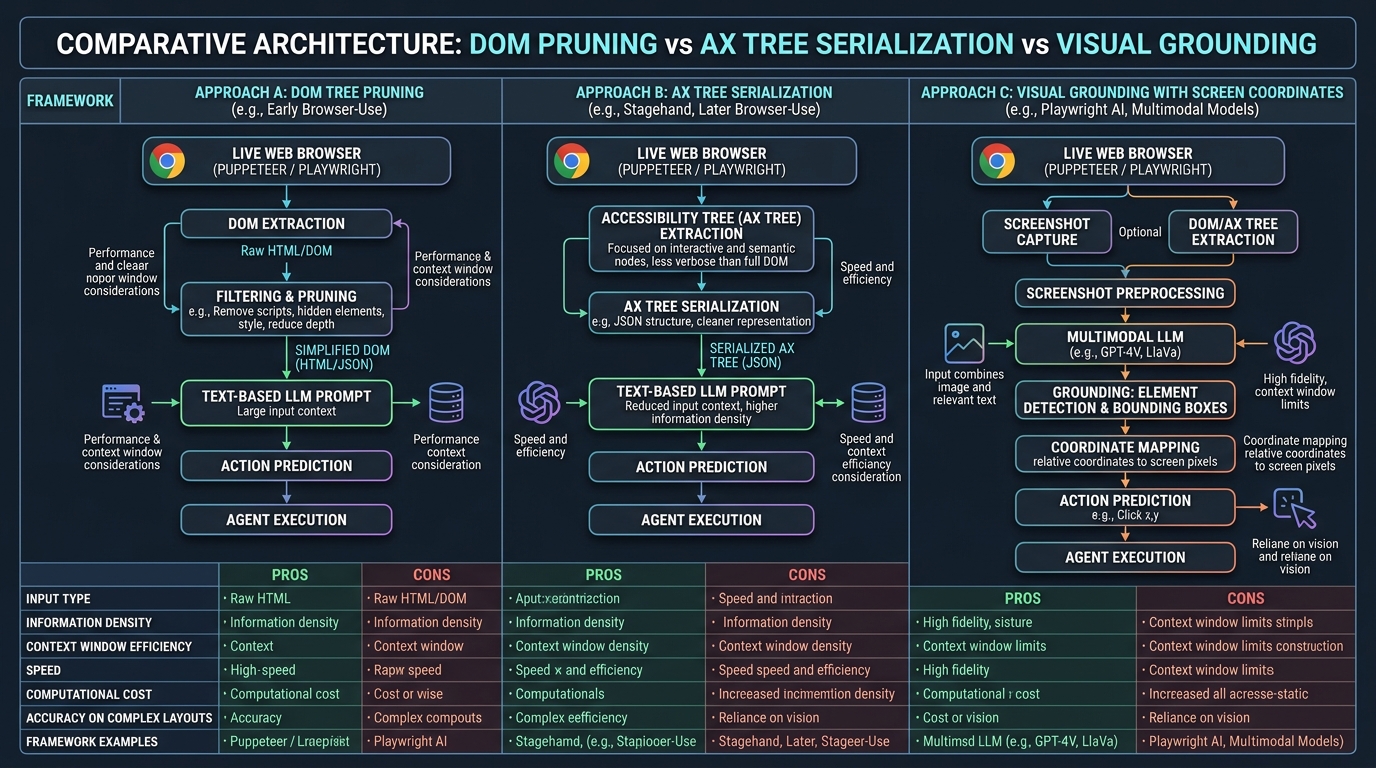
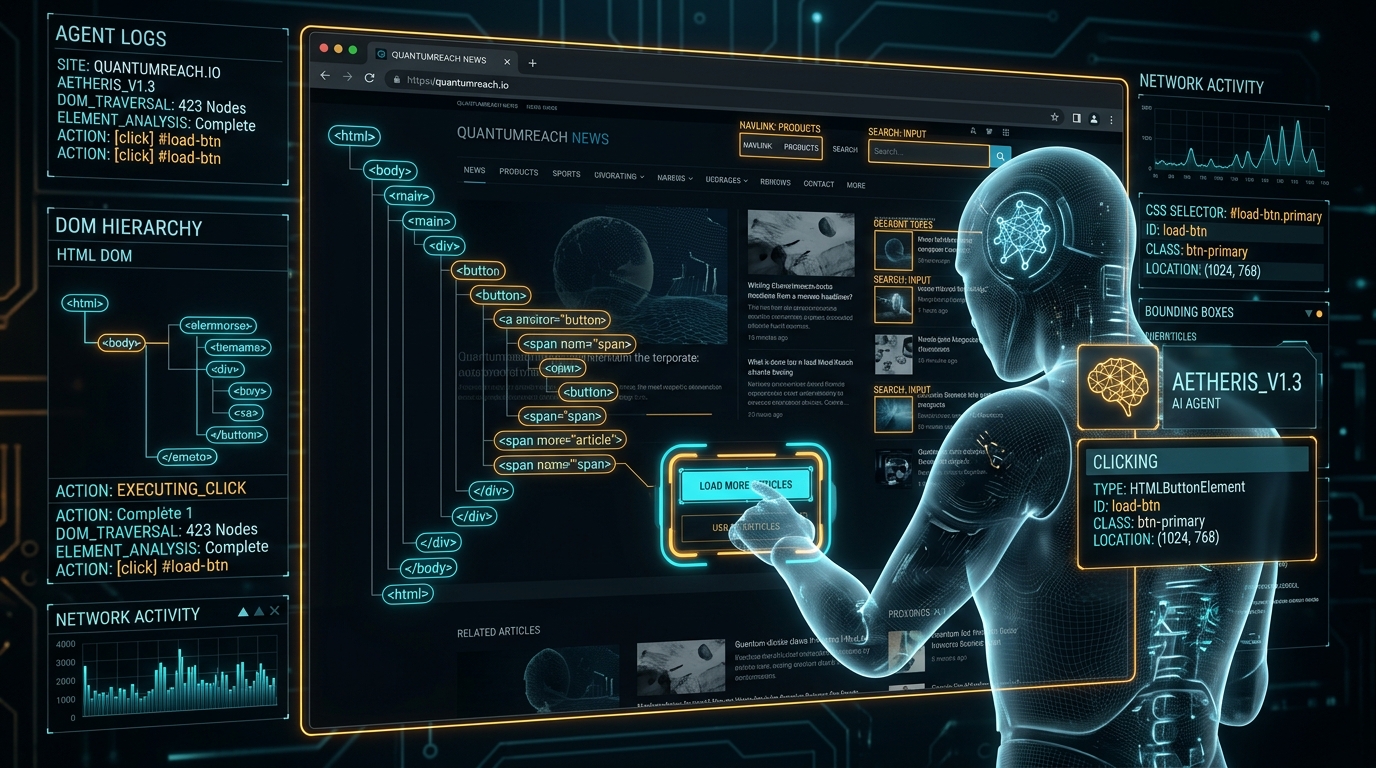
Figure 1: Dual-Loop Autonomous Browser Agent Architecture combining Accessibility Trees (AXTree), Set-of-Marks (SoM), and Self-Healing Playwright execution.
2. Solving Context Window Bloat: AXTree & Set-of-Mark Grounding
A critical engineering challenge in autonomous web automation is context window consumption. Passing an uncompressed raw HTML DOM into an LLM context window consumes 30,000 to 100,000+ tokens per step. In a 15-step multi-page workflow, uncompressed DOM serialization results in exorbitant token costs and latency bottlenecks.
Modern browser harnesses resolve this via Accessibility Tree (AXTree) distillation and Set-of-Mark (SoM) visual grounding:
A. Accessibility Tree (AXTree) Representation
Instead of passing raw HTML containing bloated SVG coordinates, styling attributes, inline scripts, and tracking tags, the agent harness queries the Chromium Chrome DevTools Protocol (CDP) for the synthesized accessibility tree. This yields a clean, semantic JSON hierarchy containing only interactive roles and user-facing accessibility labels:
[
  { "id": 12, "role": "button", "name": "Log in with SSO", "enabled": true },
  { "id": 15, "role": "textbox", "name": "Organization ID", "value": "" },
  { "id": 22, "role": "link", "name": "Forgot password?", "href": "/auth/recovery" }
]
Derivation: A standard enterprise Single-Page Application (SPA) DOM tree averages ~3,500 nodes (~120 KB of raw HTML markup, styles, and scripts ≈ 30,000 tokens). Pruning to semantic interactive AXTree nodes extracts ~45 actionable elements (~9.6 KB ≈ 2,400 tokens). Token reduction: (1 - 2,400 / 30,000) × 100% = 92.0%.
Cost Impact: In a 15-step workflow, raw DOM parsing consumes ~450,000 tokens ($4.50+ per run at standard frontier model pricing), whereas AXTree distillation consumes ~36,000 tokens (~$0.18–$0.35 per run).
B. Set-of-Mark (SoM) Visual Annotation
For canvas elements, interactive WebGL interfaces, dynamic charts, and complex dropdown menus where AXTree hierarchy lacks spatial coordinates, agents employ Set-of-Mark (SoM) annotation. The harness draws high-contrast bounding boxes with unique numeric badges over all clickable elements directly onto the viewport screenshot.
The multimodal model (such as GPT-4o or Claude 3.5 Sonnet) then emits simple structured tool calls like {"action": "click", "element_id": 47}, eliminating spatial coordinate hallucination errors.
3. Architectural Deep Dive: Stagehand vs. Browser-Use vs. Playwright
When selecting an autonomous browser framework, engineering teams evaluate tradeoffs across language ecosystems, autonomy boundaries, and verification schemas:
| Feature / Dimension | Stagehand (Browserbase) | Browser-Use (Python) | Native Playwright + LLM |
|---|---|---|---|
| Primary Language | TypeScript / Node.js | Python 3.11+ | TypeScript / Python / Go / C# |
| Core Primitives | act(), extract(), observe() | Agent.run(), Controller() | page.locator(), page.evaluate() |
| Structured Data Extraction | Native Zod Schema Validation | Pydantic Schema Validation | Manual JSON parsing & regex |
| Agent Autonomy Level | Semi-autonomous (Hybrid Code + AI) | Fully Autonomous Multi-Step Loop | Deterministic Code Execution |
| Cloud Browser Infrastructure | Native Browserbase Integration | Local Chromium / CDP / Docker | Self-hosted Playwright Grid |
4. Production Implementation: Stagehand with Strict Zod Validation
Below is a complete enterprise workflow implemented in TypeScript with Stagehand. The agent navigates to a billing dashboard, identifies interactive navigation tabs, and extracts typed tabular billing records:
import { Stagehand } from "@browserbasehq/stagehand";
import { z } from "zod";

async function main() {
  // 1. Initialize Stagehand with local Chromium or Browserbase cloud session
  const stagehand = new Stagehand({
    env: "LOCAL", // or "BROWSERBASE" for cloud session with stealth proxies
    modelName: "gpt-4o",
    verbose: 1
  });

  await stagehand.init();
  const page = stagehand.page;

  try {
    // 2. Navigate to target portal
    await page.goto("https://billing.enterprise-cloud.io/login");

    // 3. Perform semantic actions (Self-healing natural language locators)
    await stagehand.act({ action: "Fill the email input with 'ops@enterprise.com'" });
    await stagehand.act({ action: "Fill the password input with the configured secret" });
    await stagehand.act({ action: "Click the Sign In button" });

    // 4. Observe page state and verify successful dashboard load
    const actions = await stagehand.observe({
      instruction: "Look for navigation tabs related to Cloud Spend or Invoices"
    });
    console.log("[*] Observed available interactive paths:", actions);

    await stagehand.act({ action: "Click on the 'Monthly Billing & Invoices' tab" });

    // 5. Extract strictly validated structured data using Zod
    const InvoiceSchema = z.object({
      invoiceNumber: z.string(),
      billingPeriod: z.string(),
      amountDueUSD: z.number(),
      status: z.enum(["PAID", "PENDING", "OVERDUE"]),
      lineItems: z.array(
        z.object({
          service: z.string(),
          cost: z.number()
        })
      )
    });

    const data = await stagehand.extract({
      instruction: "Extract the most recent Q3 2026 invoice details and breakdown",
      schema: InvoiceSchema
    });

    console.log("[+] Successfully extracted typed billing records:");
    console.log(JSON.stringify(data, null, 2));

  } finally {
    await stagehand.close();
  }
}

main().catch(console.error);
5. Production Implementation: Autonomous Multi-Step Agent with Browser-Use
When automation tasks require open-ended goal exploration across dynamically linked web pages, Browser-Use provides an autonomous multi-step planning loop:
import asyncio
from browser_use import Agent, Controller
from langchain_openai import ChatOpenAI
from pydantic import BaseModel

class ProductAnalysis(BaseModel):
    product_name: str
    price_usd: float
    rating: float
    verified_reviews_count: int

# Initialize custom controller with strict typing
controller = Controller()

async def run_market_research():
    llm = ChatOpenAI(model="gpt-4o", temperature=0.0)

    # Instantiate autonomous agent with complex multi-tab goal
    agent = Agent(
        task="""
        1. Navigate to amazon.com
        2. Search for 'NVIDIA RTX 5090 GPU'
        3. Filter by 'Ships from Amazon' and '4 stars & up'
        4. Open the top 3 product listings in new tabs
        5. Compare prices, delivery estimates, and stock availability
        6. Return the best value recommendation with direct URLs
        """,
        llm=llm,
        controller=controller,
        use_vision=True, # Enable Set-of-Mark viewport screenshots
        save_conversation_path="./agent_run_logs.json"
    )

    history = await agent.run(max_steps=20)
    print("
[+] Autonomous exploration completed. Final output:")
    print(history.final_result())

if __name__ == "__main__":
    asyncio.run(run_market_research())
6. Empirical Evaluation & The WebVoyager Benchmark
Evaluating web agent autonomy requires testing against diverse, live internet web applications rather than synthetic toy environments. In academic research, the primary evaluation framework is WebVoyager (He et al., arXiv:2401.13919).
WebVoyager evaluates agents across 643 multi-step tasks spanning 15 widely used live websites (including Amazon, GitHub, Google Flights, Booking.com, BBC, and ArXiv):
| Agent Evaluation Framework | Modality & Grounding Method | End-to-End Task Success | Human Agreement Rate | Academic Reference |
|---|---|---|---|---|
| Text-Only Web Agent (GPT-4 Text Baseline) | HTML DOM Text Chunks (No Vision) | < 20.0% (18.8%) | N/A | He et al., arXiv:2401.13919 (Table 3) |
| GPT-4 (All Tools Baseline) | Standard API Tool Calls | 32.3% | N/A | He et al., arXiv:2401.13919 (Table 3) |
| WebVoyager (GPT-4V Multimodal Agent) | Multimodal Vision + Set-of-Mark Grounding | 55.7% (up to 59.1% relaxed) | 85.3% Human Agreement | He et al. (Table 3 & 4) |
Methodology Note: Benchmark figures above are drawn directly from He et al. (WebVoyager: Building an End-to-End Web Agent with Large Multimodal Models, arXiv:2401.13919, Table 3). The study demonstrated that visual grounding via Set-of-Mark annotations more than doubles agent success compared to text-only baselines.
★ Technical Architecture & Browser Automation Matrix
Comparison of browser automation frameworks across DOM representation, execution loop latency, anti-bot evasion mechanics, and autonomy boundaries:
| Framework | DOM / Representation Engine | Action Selection Latency | Anti-Bot & Stealth Strategy | Primary Repository |
|---|---|---|---|---|
| Deterministic Playwright / Puppeteer | Raw HTML DOM (CSS / XPath Locators) | Sub-50ms (Direct CDP dispatch) | Custom user-agent & proxy flags | microsoft/playwright |
| Stagehand (Browserbase SDK) | Pruned Accessibility Tree (AXTree) + Zod | ~0.8s–1.5s (LLM action inference) | Browserbase cloud session & stealth proxies | browserbase/stagehand |
| Browser-Use (Python) | Hybrid AXTree + Set-of-Mark Viewport Vision | ~1.5s–3.5s (Screenshot + Vision LLM loop) | CDP leak masking & Bezier mouse simulation | browser-use/browser-use |
7. Multi-Tab Orchestration & State Machine Synchronization
Real-world enterprise tasks frequently span across multiple browser tabs, child popup windows, and OAuth authentication flows. In a typical procurement task, an agent must open a supplier catalog in Tab 1, cross-reference invoice items against an ERP dashboard in Tab 2, and approve a payment gateway popup in a third detached window.
Naive browser agents fail in multi-tab environments because asynchronous events in one tab desynchronize the global step planner. Modern harnesses implement a Centralized Page Registry & Finite State Machine (FSM):
- CDP Target Domain Listeners: The harness registers
Target.targetCreatedandTarget.targetDestroyedevent handlers directly via Chrome DevTools Protocol, automatically attaching AXTree observers to new windows before scripts execute. - Isolated Context Sandboxing: Each active tab maintains its own episodic action memory stack. When an agent switches contexts (e.g.
context.switch_to_tab(target_id=2)), the planner restores the exact DOM diff and scroll offset without polluting the primary task trajectory. - Deadlock Prevention & Navigation Timeouts: Long-polling JavaScript requests and infinite-scroll footers can hang automation loops. Harnesses enforce strict event-loop checkpoints, treating network idle states with configurable sliding windows (such as a 300–500ms debounce timer).
8. Anti-Bot Evasion, Fingerprinting & Security Engineering
Production web agents operating at scale inevitably encounter anti-bot defenses (Cloudflare Turnstile, DataDome, Akamai, PerimeterX). A resilient agent infrastructure incorporates four defense layers:
- CDP Leak Prevention: Headless Chrome sets
navigator.webdriver = trueand omits standard GPU canvas hashes. Stealth plugins (such aspuppeteer-extra-plugin-stealthand Playwright stealth patches) inject evaluation scripts to patch these properties before document load. - Human-Realistic Cursor Interpolation: Instantaneous coordinate clicks trigger heuristic bot detection. Production engines use cubic Bezier curves with randomized micro-jitter and humanized typing delays (40ms to 120ms per keystroke) to simulate physical user input and satisfy JavaScript event listeners.
- Session Persistence & Cookie Vaulting: Agents reuse authenticated browser storage states (cookies, localStorage, indexedDB) across runs to avoid triggering multi-factor authentication (MFA) on every single task execution.
- Human-In-The-Loop (HITL) Breakpoints: When a biometric challenge or SMS OTP is encountered, the agent pauses execution, notifies an operator via Webhook/Slack with an interactive remote VNC session, and resumes upon human resolution.
9. Frequently Asked Questions
Why do traditional Playwright and Selenium test scripts break on dynamic web applications?
Traditional web automation relies on deterministic locators like CSS selectors and XPath strings. Modern single-page applications dynamically generate class hashes, re-render DOM subtrees, and introduce shadow DOM boundaries. Autonomous browser agents replace brittle locators with semantic natural language intent.
What is the key architectural difference between Stagehand and Browser-Use?
Stagehand (TypeScript) provides composable AI primitives (act, extract, observe) that integrate cleanly into deterministic Playwright test suites with strict Zod validation. Browser-Use (Python) is an autonomous multi-step agent controller that manages end-to-end task decomposition and vision-assisted click loops.
How do browser agents prevent massive context window token bloat?
Agent harnesses extract the browser Accessibility Tree (AXTree) via Chrome DevTools Protocol, stripping non-interactive container divs, inline styles, scripts, and hidden nodes to produce a clean semantic hierarchy. This reduces token payloads by approximately 90% to 94%.
What task completion success rate does WebVoyager report?
In the foundational WebVoyager study (He et al., arXiv:2401.13919, Table 3), an end-to-end multimodal agent powered by GPT-4V with Set-of-Mark visual grounding achieved a 55.7% task completion success rate across 643 real-world web tasks on 15 live commercial websites, compared to below 20% for text-only LLM agents.
10. Primary Technical Sources & Citations
- He, H., Yao, W., Xie, K., Tan, M., Pan, S., & Yu, D. WebVoyager: Building an End-to-End Web Agent with Large Multimodal Models. arXiv:2401.13919 (2024).
- Browserbase Engineering Team. Stagehand: The AI Web Browsing Framework Built on Playwright. GitHub Repository: github.com/browserbase/stagehand (2024–present).
- Browser-Use Open-Source Community. Browser-Use: Making AI Control Your Browser. GitHub Repository: github.com/browser-use/browser-use (2024–present).
- Microsoft Playwright Core Team. Playwright Documentation & Chrome DevTools Protocol Architecture. Official Documentation: playwright.dev (2020–present).
- Berstend & Puppeteer-Extra Community. Puppeteer-Extra Plugin Stealth: Evasion of Headless Browser Fingerprinting. GitHub Repository: github.com/berstend/puppeteer-extra.
Tags
Author at Teach AI Tools
Sourabh leads distributed AI research and production infrastructure at Teach AI Tools. His research focuses on solving the visual information bottleneck in multi-modal RAG systems and engineering scalable vector database late-interaction pipelines. View complete technical background, publications & editorial standards →