


An automation that saves five minutes when it works but creates duplicate invoices when it fails is an expensive shortcut. The buying decision should account for both outcomes. A good platform must help your team understand what ran, what changed, and what needs attention.
Zapier, Make, and n8n deserve consideration for connecting business systems and adding AI steps to repetitive work. Their billing units differ, however, and those differences can make a small-looking workflow surprisingly expensive at scale. The person who will maintain the workflow also matters as much as the person who creates the first version.
This guide uses official pricing and documentation checked on October 2, 2026. It offers research-based buying advice, not a hands-on speed benchmark. The examples are hypothetical workload models intended to make costs and failure points easier to inspect.
Begin with a workflow you can explain on paper
Take a common small-business process: a prospect submits a form, the business checks whether the contact already exists, someone reviews the request, and a follow-up task is created. AI might help classify the request or draft an internal summary. It does not need to decide every step.
Write down the input, the expected output, and the exceptions. What happens if the email address is missing? What if the prospect submits twice? What if the CRM is temporarily unavailable? Until you can answer these questions, a tool comparison will mostly measure how attractive the demonstrations look.
For your first project, prefer a process with a clear owner and an observable result. Drafting an internal summary is easier to review than autonomously negotiating a contract. You can expand the scope once you know how the system behaves.
The comparison that matters before pricing
| Platform | Main usage unit to examine | Good evaluation question |
|---|---|---|
| Zapier | Tasks from successful billable actions | How many charged actions occur per incoming item? |
| Make | Credits, with feature-specific consumption | How many modules run after each branch or loop? |
| n8n Cloud | Workflow executions | How many runs occur, including separately triggered work? |
These units cannot be compared one for one. A workflow with six steps may produce several charged actions, several module operations, or one execution, depending on the platform and how it is built. Feature availability and maintenance still need to be considered alongside usage.
1. Zapier: calculate the actions behind each business event
Zapier describes tasks as successfully completed actions, with each billable action counting separately. Polling for new data does not itself consume tasks. Its pricing documentation also identifies exclusions and explains behavior at task limits, so check the current rules for the particular steps you intend to use. Zapier pricing and task definitions
For a hypothetical process handling 500 leads monthly, four billable actions per lead would mean 2,000 tasks, before additional work. That is not a quoted plan recommendation: it is the arithmetic to perform after identifying which steps count. Do not assume that 500 incoming forms require only 500 tasks. Zapier billing units
My suggested reason to shortlist Zapier is a business process whose required applications and actions can be demonstrated cleanly in its workflow. During the trial, verify the exact operation you need. An integration bearing the right app name may still lack a particular field, trigger, or attachment behavior.
Ask the eventual owner to inspect a failed run and explain what happened. They should be able to tell whether the contact was created, whether the follow-up task exists, and which step can safely be retried. If only the original builder understands the workflow, document that dependency before launch.
Also decide what should happen at the usage limit. A paused workflow and a higher bill are different business outcomes. Check the selected account's overage setting, notification recipients, and spending controls before processing production volume.
Zapier deserves evaluation when the workflow can be maintained by the people responsible for the business process. Do not select it from integration count alone. The important evidence is a complete working path through your specific applications and exceptions.
2. Make: inspect the work created by branching and loops
Make's free plan lists 1,000 credits per month and a 15-minute minimum interval for scheduled scenarios. Paid requirements depend on the selected credit volume and features. That scheduling limit matters if your process needs a faster response; a generous monthly allowance does not guarantee the required timing. Make pricing
Make documents credits as its current billing unit. Non-AI operations generally consume one credit each, while AI-related consumption can also depend on tokens and connection type. With a custom AI provider connection, provider token charges are paid separately; Make-provided connections can account for usage differently. Make credit documentation
The important budgeting exercise is to follow every item through the workflow. Suppose 100 orders each contain ten line items and each line item passes through three ordinary, one-credit operations. Those downstream operations alone would consume 3,000 credits. Retrieving orders, other steps, and any extra AI usage would be additional. This is an illustrative calculation, not a measured Make scenario.
That example explains why a workflow can become expensive without receiving many new orders. A single input can expand into many processed items. Sketch the expansion before selecting the credit package.
For the trial, include an order with no optional fields, one with many line items, and one that needs a different branch. Check the output of each step rather than only the final success indicator. A technically successful workflow can still put the wrong value into the right field.
Make is worth evaluating when your team wants to inspect a process with several branches and transformations. The condition is that someone takes ownership of the structure. A large visual workflow still needs clear names, documented assumptions, and a recovery procedure.
3. n8n: compare execution pricing with operational responsibility
n8n Cloud's Starter plan is listed at €20 per month, billed annually, with 2,500 workflow executions and unlimited steps within those executions. Its pricing model counts workflow runs rather than charging for every node as a separate unit. Concurrency and other plan limits still apply. n8n pricing
This can make a many-step workflow worth evaluating, but it does not establish that n8n is automatically cheaper. Count the actual runs your design creates, including separately triggered processes, and examine the rest of the operating cost. Model-provider usage or other connected services may have their own charges.
If you are considering self-hosting, compare two distinct purchasing decisions: using managed software and operating software yourself. In the second case, someone must own upgrades, backups, monitoring, access, and recovery. Put that person's time in the budget rather than treating the absence of a hosted subscription as the entire cost.
Before choosing self-hosting for a client-facing commercial service, review the current license for that specific use. Internal automation and selling hosted access are different scenarios; resolve eligibility before building the service around an assumption. n8n license documentation
My trial would include restoring a test workflow from a backup and rotating a test credential. These exercises reveal whether the team can maintain the installation it intends to depend on. If nobody owns those tasks, a managed option may be the more realistic comparison.
Shortlist n8n when the team is prepared to examine workflow logic and ongoing operations. Execution-based pricing is a useful input to the decision, but it should not hide the work required to keep business processes dependable.
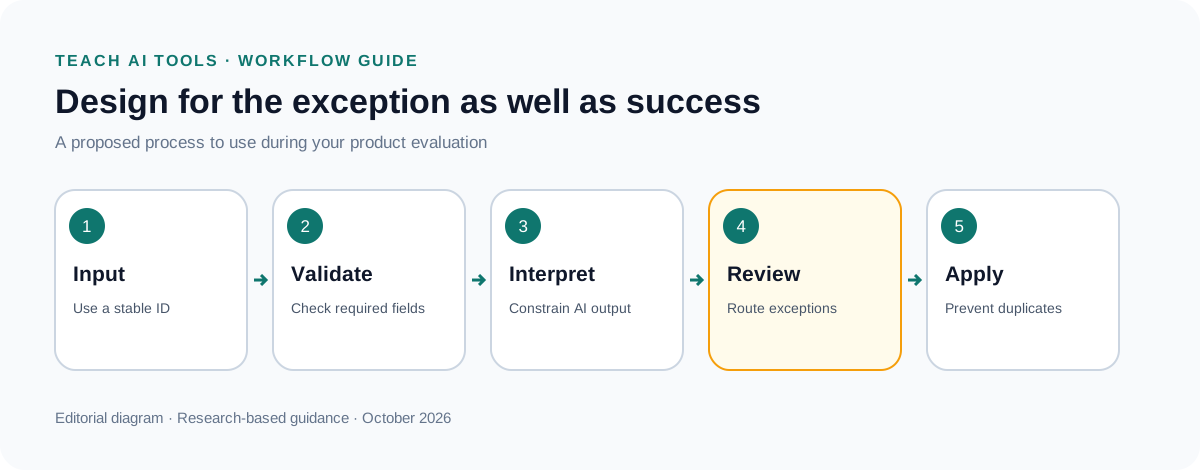
Where AI helps, and where explicit rules are clearer
Use explicit rules for known conditions: an empty field, a fixed approval threshold, or an exact customer identifier. Add AI where the input requires interpretation, such as grouping differently worded enquiries into a small set of categories.
Constrain the AI step's output. For example, ask it to choose among “sales enquiry,” “existing customer support,” and “needs review,” then validate that the returned value belongs to that list. Keep an exception route for ambiguous material. A confident-looking sentence is not a substitute for a usable structured result.
For early deployments, send proposed changes to a review queue before applying them to important records. Preserve the original message alongside the suggested classification. That gives a reviewer enough context to correct the decision without recreating the entire process.
The aim is to reduce repetitive interpretation while keeping the workflow understandable. Adding an autonomous agent to every step can make a simple process harder to explain and budget.
Test recovery before calling the workflow finished
Submit the same test item twice. Disconnect a test integration. Provide malformed data. Simulate a timeout after a downstream action has already happened. Then check whether rerunning the process creates duplicates.
Use a stable identifier for each business item and record whether the intended action has already completed. This is the practical idea behind idempotency: repeating a request should not accidentally repeat its business effect. The exact implementation depends on the connected system.
Create an exception queue with an owner and enough context to act. “Automation failed” is a weak alert. “Order 1042 reached the CRM but the follow-up task was not created” gives someone a useful starting point.
Set a review schedule for failed runs and usage. Otherwise, a workflow can appear to save time while quietly accumulating incomplete work. Include the recovery steps in a short handover document and ask a colleague to follow them with sample data.
A practical cost model for the buying decision
Estimate low, ordinary, and peak monthly volume. For each level, count the appropriate usage units, additional AI costs, and maintenance time. Include seasonal campaigns or month-end processing if they change the workload.
Record annual commitments separately from monthly costs. An annual-equivalent price is useful for comparison, but the upfront commitment matters to a small business's cash flow. Keep currencies explicit rather than directly comparing a euro quote with a dollar quote.
Finally, measure the existing manual process. If the task happens only twice a month, a complex automation may not repay its maintenance burden. If it happens hundreds of times and the exceptions are well understood, the case becomes stronger.
Start with Zapier for a demonstrated app-to-app process, Make for a workflow whose branching you want to inspect carefully, and n8n when execution pricing and operational control fit the team's capabilities. Choose after testing failure recovery as well as the successful path. Dependable automation is work someone can understand and maintain after the original builder moves on.