


A useful meeting assistant should help you answer three questions after a call: what was decided, who owns the next step, and when it is due. A fluent summary that gets one of those details wrong can create more work than taking notes manually.
Consider a client saying, “We can launch on Friday if finance approves the revised budget.” A poor follow-up turns that into “Launch confirmed for Friday.” The issue is not spelling. The tool has converted a conditional plan into a commitment. That is the kind of mistake your trial should be designed to catch.
This guide compares Otter, Fireflies, and Fathom using official plan documentation checked on October 2, 2026. It explains where each belongs on a shortlist, without claiming a hands-on transcription contest. Recommendations and evaluation exercises are editorial analysis; product capabilities and allowances are linked to their sources.
Choose according to what happens after the call
| Your situation | First candidate to evaluate | Detail to verify |
|---|---|---|
| You need recordings, transcripts, and searchable notes | Otter | Meeting length and imported-file limits |
| You need a shared record across many conversations | Fireflies | Storage, AI credits, and access settings |
| You want an individual free starting point | Fathom | Advanced summary limits and team requirements |
The table is a route into evaluation, not a universal ranking. A consultant holding six substantial calls a month has different needs from a manager overseeing several people whose meetings overlap. Count the workload before comparing subscription labels.
1. Otter: inspect the limits on your kind of recording
Otter's Basic plan lists 300 transcription minutes per month and three lifetime audio/video file imports. Pro lists 1,200 in-app recording minutes, ten file imports per month, and a 90-minute maximum meeting length. These are separate constraints: a monthly minute allowance does not remove a per-meeting cap or an import limit. Otter pricing
That distinction matters if you already have an archive of interviews or training calls. Before choosing a tier, separate new meetings from existing files you plan to upload. Also list the longest routine meeting. A monthly allowance that looks generous can still be unsuitable for a two-hour workshop.
For example, eight hypothetical 75-minute client calls total 600 minutes. That exceeds Basic's stated monthly allowance. It does not, by itself, prove that a paid plan fits: you still need to account for imports, other calls, and how the meetings will be captured. Otter allowance details
During research, the pricing page also displayed a regional promotion with payment eligibility conditions. For that reason, this guide does not present a promotional amount as a worldwide subscription price. Check your own checkout currency, billing interval, and eligibility before using a discount in the budget. Otter pricing conditions
My suggested trial is a discussion with several speakers, a revised deadline, and a technical term used repeatedly. Compare the transcript and summary with a short manual decision log. The aim is to establish whether the output reduces the work of producing an accurate follow-up.
Otter should be considered when recording and retrieving the substance of a meeting are central needs. If your main requirement is a specific downstream sales workflow, demonstrate that complete workflow before treating transcription alone as sufficient.
2. Fireflies: distinguish transcription from storage and extra AI usage
Fireflies' annual pricing lists Pro at $10 per seat per month and Business at $19. Pro includes 8,000 storage minutes per seat and twenty AI credits; Business lists unlimited storage and thirty AI credits. The free plan advertises unlimited transcription with qualifications, while listing limited summaries and 400 storage minutes per team. Fireflies pricing
The important lesson is that “unlimited transcription” is not shorthand for unlimited storage, every analysis feature, and every kind of AI usage. Those are different dimensions of the service. Inspect the requirements for the actual features you plan to use rather than selecting a plan from one word in the headline.
For a team, model how recordings accumulate. Ten hypothetical employees each retaining four hours of calls per week would add 2,400 minutes weekly. This is an illustrative workload calculation, not a claim about how any particular subscription pools or retains storage. Ask the vendor to show how your configured account handles that volume.
Evaluate retrieval with a practical question: “What did this customer say about the migration deadline in their last two calls?” Then check the answer against the recordings. A shared archive is useful only if people can locate the right evidence without confusing customers, dates, or tentative plans.
Also run a permissions exercise. Use a harmless test recording and try viewing it as its owner, a colleague, and someone outside the team. Document who can discover, play, export, or share it under the selected configuration. Do this before making sensitive client meetings part of a routine shared archive.
Fireflies deserves a place on a team's shortlist when the record needs to serve several people. The purchasing case should explain how those people will use it. Retaining every conversation without an owner or review process can create a growing library that nobody consults.
3. Fathom: an accessible individual trial, with team choices to examine
Fathom's free plan lists unlimited recordings and transcriptions, instant summaries, and clips. Premium adds advanced summaries and AI action items. Team plans have a two-user minimum; Business lists CRM field synchronization and coaching features. Its bot-free capture option is marked as a Mac beta in the feature table, so it should not be assumed available in every setup. Fathom pricing and feature matrix
That makes the free offering a reasonable candidate for an individual who wants to assess the basic habit of recording, reviewing, and following up. Start by checking whether the capture method works with your device, meeting platform, and organization settings.
If you move toward a team subscription, evaluate the team job separately. A good personal summary does not prove that shared search, account ownership, and administrative controls fit your company. Invite the people who would actually review recordings and ask them to complete a realistic task.
For sales-related use, take special care with automated field updates. A customer discussing a possible budget is different from confirming an approved budget. During a pilot, compare proposed updates with the conversation before allowing them to become the record others rely on.
Fathom's plan structure also illustrates why a minimum seat count belongs in your comparison sheet. A quoted per-user rate may not equal the smallest purchase available. Record the complete subscription total alongside the price per person.
An accuracy test that goes beyond readable summaries
Prepare a short test call with permission from the participants. Use fictional customers and harmless business details. Include two people with similar names, an amount corrected later, a task reassigned midway through the call, and a decision that depends on someone else's approval.
Write the correct outcome before reading the generated summary. Otherwise, polished wording can influence your judgment. The reference should contain the final amount, actual owner, deadline, unresolved question, and the condition attached to the decision.
Grade each assistant on those items separately. Mark a missed qualification as an error even if most of the summary is accurate. Mark an invented action as an error even if it sounds useful. Your aim is to assess whether the tool preserves the meeting's meaning.
Next, repeat the exercise with a real, permitted call. Include ordinary background noise and the terminology your team uses. A perfectly scripted recording can test one failure mode, but it does not represent the full working environment.
Do not turn a small trial into a sweeping accuracy percentage. “It captured all five decisions in this call” is a defensible observation. “It is 99% accurate” requires a much more carefully defined evaluation. Keep the original examples so colleagues can inspect the basis for your choice.
Build a follow-up process around verification
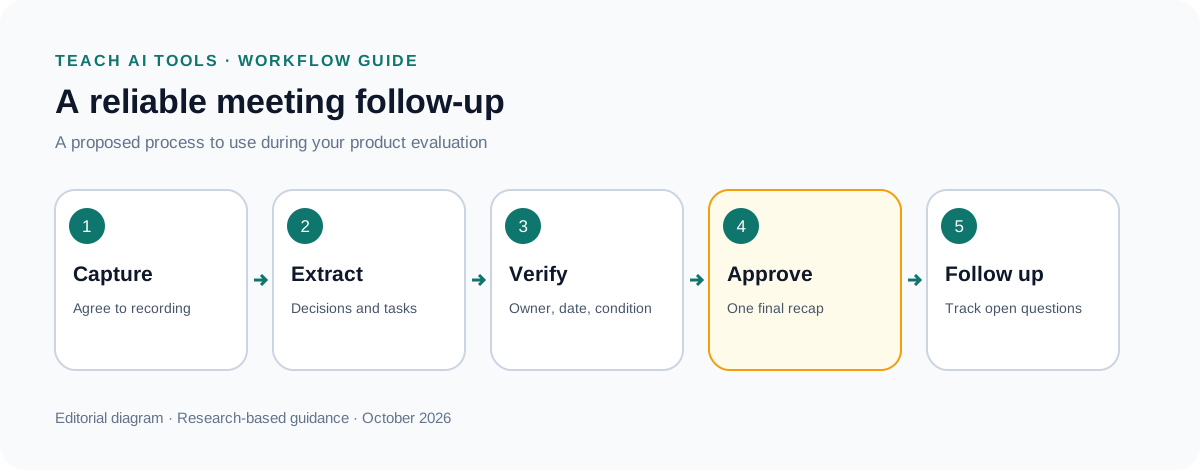
Assign one person to approve the meeting record. They should verify decisions, commitments, dates, and responsibilities before circulating a client-facing summary. Minor grammatical polishing comes after those checks.
A useful follow-up has three sections: confirmed decisions, actions with owners, and open questions. Put conditional plans in the open-question section until the condition is satisfied. Link to the relevant moment when your workflow supports it, or include a brief reference that allows someone to find the source.
Keep observations separate from agreements. “The client seemed interested” is an interpretation; “The client requested a proposal by Tuesday” is a recorded action. This distinction becomes especially important when summaries are copied into a CRM or project tracker.
For an agency, agree internally on who can send the final recap. Having multiple people send slightly different AI-generated versions creates avoidable confusion. The assistant should make one reliable follow-up easier to produce.
Check recording, sharing, and retention before rollout
Explain the recording process to participants and follow your organization's requirements for permission. Provide a workable alternative when recording is inappropriate. Do not make silent recording the default simply because a capture method is technically available.
Decide which meetings should be excluded, who owns the recordings, and when material should be deleted. Test the deletion and export processes using sample data. Also check what happens to an employee's recordings when that person leaves the organization.
These are purchasing questions, not guarantees supplied by an “enterprise” label. Ask for the specific controls included in the quoted plan. If your organization has data-handling requirements, have the responsible person review the proposed configuration before broader use.
Calculate value using the whole follow-up task
Measure the time spent reviewing the output, correcting mistakes, writing the final recap, and updating other systems. Subtract that from the time your existing process takes. Fast generation is useful only if the resulting work is reliable enough to use.
For a hypothetical consultant with twenty calls per month, saving eight minutes per call would recover 160 minutes. If review instead expands by five minutes because the output needs extensive checking, that changes the calculation. These are planning examples, not performance claims for the products above.
Start with Otter when recording limits fit your workload, Fireflies when shared conversation records justify a team evaluation, or Fathom when an individual free trial provides a practical entry point. Choose after completing the follow-up process, including correction and sharing. The best assistant is the one that helps people remember and act on what was actually agreed.