

Start with the part of your workflow that costs you the most time. If a recording already exists, an avatar generator is unlikely to solve the editing problem. If you cannot keep track of approved drafts, another writing subscription may simply produce more unfinished material. Choose a tool for a named task and a defined deliverable.
For a new creator, my starting recommendation is a free editing and design pilot using CapCut and Canva, with a simple content calendar in Notion Free. Add Descript when editing spoken-word recordings is the main obstacle, OpusClip when extracting shorts is a recurring job, or ElevenLabs when approved synthetic narration is necessary. The free options have restrictions; this is a pilot recommendation, not a promise of unrestricted production access.
Evidence and check date: this is an official-source research comparison checked on October 14, 2026. No firsthand editing, voice-quality or performance comparison was run. The recommendations below concern documented workflow fit. The budget calculations and five-format brief are original planning examples.
Sponsorship and affiliate disclosure: this site's previous version carried Descript and ElevenLabs promotional placements, and affiliate links can earn the site a commission. Both products also appear in this comparison. Those ad placements have been removed from this page, and the source links here are direct research references rather than referral links. Commercial relationships are not evidence of performance or a reason to rank a product first. All links in this revised page include nofollow.
Choose the task before choosing the tool
This shortlist keeps the original ten products but separates their jobs. A content calendar, a research assistant and a video editor are not interchangeable subscriptions. Start with one production bottleneck, then add an adjacent tool only when you can explain what it supplies that the first tool does not.
| Tool | Suggested job | Named capability to investigate | Main purchase question |
|---|---|---|---|
| CapCut | Edit a short video from existing footage | Captions and editing tools; paid Standard/Pro features also exist | Can the specific project export with the assets and features you need? |
| Descript | Edit an interview or podcast through text | Transcript editing, Studio Sound, Remove Filler Words, Underlord | Do its media and AI allowances fit your recordings? |
| OpusClip | Find draft shorts inside a long recording | AI clipping, reframing and captions | Can you correct and export the clips under your plan? |
| Canva | Make covers, slides and recurring social graphics | AI design tools, resize and background removal | Which plan includes your assets, brand tools and AI allowance? |
| ElevenLabs | Produce narration from an approved script | Text to Speech, Voice Design and voice cloning | Are commercial rights and sufficient credits included? |
| Synthesia | Produce a scripted presenter video | AI avatars and video creation | Do you need downloadable, unbranded videos rather than a free share link? |
| Pictory | Turn a reviewed script or article into a video draft | Script/URL-to-video, stock footage and captions | Will you use its included narration rather than buy overlapping tools? |
| Jasper | Create marketing copy using shared brand context | Brand Voices, Knowledge assets and marketing agents | Is brand consistency the missing capability in your existing writing process? |
| vidIQ | Research and develop YouTube ideas | AI Coach, ideas, thumbnails and trends research | Do suggestions improve your actual planning decisions? |
| Notion | Keep briefs, sources, drafts and approvals together | Databases, Notion Agent and AI workspace features | Do you need paid AI, or just a free editorial calendar? |
Use the vendor references in the price tables and product sections to check feature access. The practical test is whether you can finish one representative item, reopen it for a correction and deliver the required file. Buying access to a named AI feature is not the same as demonstrating that it improves your content.
Current prices, free access and billing units
Here are selected plans that a solo creator or small team might evaluate. Dollar figures are USD public rates; monthly and annual billing are kept separate. An annual monthly equivalent usually requires an upfront annual commitment. Taxes, extra usage, discounts and regional checkout differences are excluded. The table is generated from the same price data used for the stack totals below.
| Tool and plan | Monthly billing, USD | Annual monthly equivalent, USD | Main allowance | Official source |
|---|---|---|---|---|
| Descript Hobbyist | $24 | $16 | 10 media hours and 400 AI credits/month; 1080p watermark-free export | Pricing |
| OpusClip Pro | $29 | $14.50 | 300 credits/month; 2 seats; 2-month unused-credit rollover | Pricing |
| ElevenLabs Starter | $6 | $5 | 30,000 shared credits/month; commercial licence; introductory promotions excluded | Pricing |
| Synthesia Starter | $29 | $18 | 1,250 credits/month or 15,000/year; paid downloads and logo removal | Pricing |
| Jasper Pro | $69 | $59 | 1 seat; 2 Brand Voices, 5 Knowledge assets and 3 Audiences | Pricing |
| Pictory Starter | $29 | $25 | 1 user; 200 video minutes/month or 2,400/year; 100 AI credits/month on monthly plan | Pricing |
| Notion Business | $24 | $20 | per member; AI workspace features included; Custom Agents need separate Notion credits | Pricing |
Other tiers are available. For a larger Descript requirement, Creator is listed at $35 monthly or $24 per person per month billed annually, with 30 media hours and 800 AI credits monthly. OpusClip Starter is $15 billed monthly with 150 credits; the Pro row is used in the annual stack comparison because its $174 annual total is explicitly listed. These are plan comparisons, not interchangeable allowances.
Canva and vidIQ displayed India-localised pricing during the browser check. They are shown separately in rupees rather than silently converted into dollars or added to a USD total.
| India pricing observed | Monthly billing, INR | Annual billing | Billing unit and source |
|---|---|---|---|
| Canva Pro Lite | ₹199 | ₹1,590/year | One person; India pricing page |
| Canva Pro | ₹500 | ₹4,000/year | One person; same source |
| Canva Business | ₹680/person | ₹6,800/person/year | Per person; same source |
| vidIQ Boost | ₹999 | ₹416.58/month equivalent, billed yearly | Displayed annual rate is rounded; plans |
| vidIQ Max | ₹2,490 | ₹1,999/month equivalent, billed yearly | Displayed rate; same source |
For CapCut, the vendor's Standard-versus-Pro guide quotes Pro at $19.99 monthly or $179.99 annually. This is a vendor reference price, not a verified India checkout quote. Its pricing help says cost can vary by region, device and promotions. The previous claim that CapCut has no paid tier was incorrect: paid subscriptions exist, and a free workflow must avoid features or assets requiring payment.
What is actually free?
| Tool | Free access or trial | Restriction that matters |
|---|---|---|
| Descript | Free plan; feature page lists 1 media hour/month and 100 one-time AI credits | One-time AI credits are not a monthly refill; paid plans add allowances and watermark-free export |
| OpusClip | 60 credits/month | Watermark, no editing, clips cease to be exportable after 3 days |
| ElevenLabs | 10,000 credits/month | Free use is non-commercial with attribution; paid commercial rights matter |
| Canva | Free design plan with limited AI access | Premium assets and tools are plan-dependent; AI use consumes a shared allowance |
| CapCut | Free editing access alongside paid plans | Inspect the actual project's feature/asset requirements before export |
| Synthesia | Basic free plan | Share links and a Synthesia watermark; Starter adds downloads and logo removal |
| Jasper | 7-day Pro trial | Trial access is not a permanent free subscription |
| Pictory | Pricing page lists a 14-day trial | Trial video allowances differ from the paid Starter plan |
| vidIQ | Free plan with 150 AI credits monthly | Paid plans have larger allowances and broader access |
| Notion | Free workspace with a limited AI trial | Business includes broader AI access; it is not the old $10 AI add-on model |
Sources for the Descript free details: current feature page and media/AI usage explanation. ElevenLabs' billing documentation distinguishes non-commercial free use with attribution from paid commercial rights. The remaining restrictions come from the linked pricing pages. A free account is useful for evaluating a workflow, but its output may not be suitable for a paid client deliverable.
Recording and editing: Descript, CapCut and OpusClip
Descript: editing spoken content through its transcript
Choose Descript for a trial when cutting interviews, lessons or podcasts is the recurring task. Its pricing page names Studio Sound, Remove Filler Words, Create Clips, Underlord and AI Speech. These are more useful buying details than the older article's promise that a voice correction reads “perfectly.”
Use a recording you are authorised to process. Remove one off-topic paragraph through the transcript, then listen to the complete transition. Check whether the cut preserves the speaker's meaning and whether the video remains comfortable to watch. Next, compare a difficult audio section before and after enhancement. Keep a processed version only when the actual sound is suitable for release.
Media hours and AI credits are separate allowances. A subscription can have enough media capacity while an AI operation requires additional credits. Record both balances during the pilot instead of translating either allowance into a guaranteed number of finished videos. Start with Hobbyist when its listed allowances fit; move up for a demonstrated requirement such as more source media or 4K export.
CapCut: a short-video editing pilot
CapCut is a reasonable first editing candidate when you want to assemble a short video from footage you already own. Its official product and pricing pages describe editing and AI tools; the existence of Standard and Pro plans means “completely free” is not a reliable description of the whole product.
Build a small project with the caption style, effects and assets you intend to use, then inspect the export requirements before investing in a full series. Read every caption against the recording. A correctly spelled sentence can still contain a wrong number or omit a word that changes the meaning.
Keep an editable project and the original footage. For client material, check the applicable account and processing terms before uploading it. The previous speculation that the business model was “brand equity and data” has been removed; it was not a sourced fact and is unnecessary to choosing an editor.
OpusClip: candidate shorts, followed by editorial selection
OpusClip's plan page documents AI clipping, captions and reframing. Use it when your source is a long recording with passages that can stand independently. A product demonstration or screen-recorded lesson can need different framing from a speaker-only interview.
Review every candidate with the surrounding source passage. Reject a clip that removes a condition, cuts off an answer or implies agreement that the speaker did not give. Inspect the crop at mobile viewing size so a face, chart or demonstration remains visible.
Treat the Virality Score as the vendor's suggestion for prioritising review, not an established forecast of views. The free plan's watermark, editing restriction and short export window make it a limited pilot. If you need a correction before release, verify that the chosen paid workflow lets you make and retain it.
Graphics and narration: Canva and ElevenLabs
Canva: keep the layout reusable
Use Canva for a cover, a carousel or a repeatable slide layout when you need visual consistency across releases. The checked India pricing page lists Free, Pro Lite, Pro and Business. It describes AI allowance as shared across tool categories at different consumption rates; the older universal “50 free / 500 paid credits” table has therefore been replaced.
My first design task would be one cover layout with editable text, a consistent palette and room for several title lengths. Make a second version from that same layout rather than generating another unrelated design. Inspect a mobile-size export and confirm that the title is readable before extending the set.
Upgrade for a concrete need such as the required premium assets or brand controls. Check AI tools against Canva's AI access guidance rather than assuming every generation costs the same amount. Review text, image suitability and the terms for the specific assets you use; a subscription does not resolve every possible rights issue.
ElevenLabs: separate narration cost from rights
ElevenLabs is a relevant shortlist option for scripted narration or authorised voice work. Its pricing page now uses shared credits across products. Starter's regular listed monthly price is $6; an introductory offer is not the recurring rate used in these budgets. Annual billing is listed as ten months' cost, giving a $5 monthly equivalent for Starter.
Its free licence is for non-commercial use with attribution. For a commercial narration pilot, confirm the paid licence and permissions for the script and voice. Do not assume that upgrading later changes the rights attached to an earlier free generation. Use your own authorised voice or an appropriately licensed option.
Choose a short passage containing your actual difficult words: brand names, a date, a price and an abbreviation. Listen before generating the whole script. Correct pronunciation and emphasis at the sentence level, save the approved script beside the audio and record the credit balance after revisions. This guide does not judge the voices' naturalness because no listening comparison was performed.
Scripted video, writing and planning: five different jobs
Synthesia: presenter-led content from a checked script
Synthesia belongs in a shortlist for a scripted lesson, training module or explanatory presenter video. Its current pricing page lists Basic, Starter, Pro and Enterprise. Starter is $29 monthly or $18 per month billed annually, and the page uses shared credits rather than one universal finished-video allowance.
Begin with one scene that contains a name, number and instruction. Confirm pronunciation, caption accuracy and whether the presentation supports the intended message. Also inspect the delivery route: a free watermarked share link and a downloadable paid video are different deliverables.
Use the published credit estimate as a planning input, then observe the actual charge in your account. Keep approvals for any likeness or voice involved in the project. A generated presenter is useful for some formats, but it is an unnecessary purchase when you already have suitable recorded footage.
Pictory: an article-to-video draft
Pictory's pricing page describes script/URL-to-video, stock assets, captions and narration. Starter is $29 monthly or $25 monthly equivalent billed annually. Its generated-media credits and video-minute allowances are separate, so do not treat a credit as a minute of completed video.
For a factual explainer, supply an approved script first. Review each automatically selected scene for meaning. Footage of the wrong device, city or process can mislead even when the narration is accurate. Replace unsuitable stock selections and check the asset terms for your release.
Pictory includes narration allowances in its plans. Try that included route before buying another voice subscription. Add a separate voice tool only if you can identify the required capability or delivery style that the included option fails to supply.
Jasper: brand-guided marketing drafts
Jasper's Pro plan is $69 per seat monthly or $59 per month with annual billing. The documented package includes Brand Voices, Knowledge assets and Audiences. Its role in this comparison is coordinated marketing writing, not independently verified factual research.
Use an approved product brief and the same brand instructions to request two formats, such as an email and a landing-page introduction. Compare whether the claims, offer conditions and tone remain consistent. Keep invented product capabilities or unsupported statistics out of the final copy even if the language sounds persuasive.
For an occasional solo blog post, I would first use the writing support already available in the existing workflow. Jasper is a more defensible purchase when repeatable brand guidance solves a recurring problem across campaign formats. The previous inexpensive Creator-plan assumptions are not carried into the new budgets.
vidIQ: YouTube planning assistance
vidIQ's plan page lists Free, Boost and Max, including AI Coach and credit allowances. The browser showed INR rates, so this guide does not substitute an older dollar price or label it “Basic.”
Evaluate it with one real editorial question: which of three possible video topics is supported by the available channel and audience evidence? Record the suggestions, the source of the data and your decision. A generated title, thumbnail suggestion or trend signal is an input to that decision, not a promise of traffic.
Try the free research workflow before paying for a larger allowance. Compare a recommendation with the information already available in your own channel analytics. Buy additional capability when it changes a useful planning decision, not simply because a score makes a draft feel more certain.
Notion: the source of truth for your content calendar
Notion Free can hold an editorial calendar, briefs and links to approved assets without a paid AI subscription. Its pricing page lists a limited AI trial on Free and Plus, and broader AI workspace features in Business. Business is $24 per member monthly or $20 per month billed annually. Custom Agents require separate Notion credits.
Start with fields for owner, status, target date, source brief, rights approval and final file location. Define what “approved” means before using assistance to summarise project notes. An AI-generated task list cannot resolve an unclear editorial decision.
Choose Business for the AI workspace features you actually need, rather than adding the previous article's $10 AI add-on to an otherwise unspecified plan. Give collaborators access only to the material they need; a client deliverable need not expose every draft or internal note.
Four paid stacks with totals you can audit
The stacks below use one paid seat/member per listed product, regular USD prices and free support tools. They deliberately omit paid Canva and vidIQ so currencies are not mixed. Each annual total adds the individual subscriptions' annual charges; the figure is an upfront annual budget, not a monthly invoice.
| Example stack | Monthly calculation, USD | Monthly total | Annual monthly equivalent | Annual upfront total | Free support / scope |
|---|---|---|---|---|---|
| Spoken-word editing and narration | Descript $24 + ElevenLabs $6 | $30 | $21 | $252 | Canva Free and Notion Free for graphics/planning |
| Interview editing and short clips | Descript $24 + OpusClip $29 | $53 | $30.50 | $366 | Canva Free for cover layouts |
| Marketing writing with an AI workspace | Jasper $69 + Notion $24 | $93 | $79 | $948 | Canva Free; use this only if both paid roles are needed |
| Article-to-video with an AI workspace | Pictory $29 + Notion $24 | $53 | $45 | $540 | Included Pictory narration; no extra voice subscription assumed |
For the narration pair, the calculation is $24 + $6 = $30/month, or $16 + $5 = $21/month equivalent on annual subscriptions. The earlier $17 recommendation depended on prices and plans no longer used here. The writing stack is $69 + $24 = $93/month, including the full Notion Business membership rather than omitting its listed cost.
These are menu examples, not recommendations to buy every component. If you only need calendar organisation, replace Notion Business with Free. That reduces the Jasper example to $69 monthly and the Pictory example to $29 monthly. Likewise, if you record your own narration, do not add a synthetic-voice subscription by default.
For an India-localised upgrade, Canva Pro plus vidIQ Boost would add ₹500 + ₹999 = ₹1,499/month at the observed monthly rates. Keep that amount as INR alongside any USD subscription budget. A single converted grand total would require a dated exchange rate and your actual payment fees, neither of which is assumed here.
Before subscribing annually, save a record of the renewal price, billing unit, included allowance and cancellation terms. Add any required seats and likely extra usage to your own budget. Use a monthly pilot when the annual saving is less valuable than the ability to discover a mismatch early.
One approved lesson, five publishing formats
Here is an original planning example, not a claim that the tools produced these outputs. The source is a ten-minute recorded lesson titled “Three ways to reduce food waste at home.” The editor has a checked script, permission for the recording and an approved list of factual claims.
| Format | Planned output | Tool role | Acceptance check |
|---|---|---|---|
| Full video | One edited ten-minute lesson | Descript or CapCut for the edit | Sound, captions and demonstrations match the source |
| Short clips | Three 30–45-second extracts | OpusClip for candidates; an editor selects them | Each extract stands alone without changing the advice |
| Written explainer | One article based on the approved script | Human draft; Jasper optional for marketing adaptation | No new factual claim without a source |
| Carousel | Five editable cards | Canva layout | Mobile legibility and consistent wording |
| One short introduction linking to the lesson | Existing writer/workspace; Jasper optional | Accurate promise and correct destination link |
This is five formats, with eleven individual outputs if the three clips and five cards are counted separately. It avoids the older mismatch between “five ways” and an uncounted seven-item list. No extra chatbot subscription is required by the example.
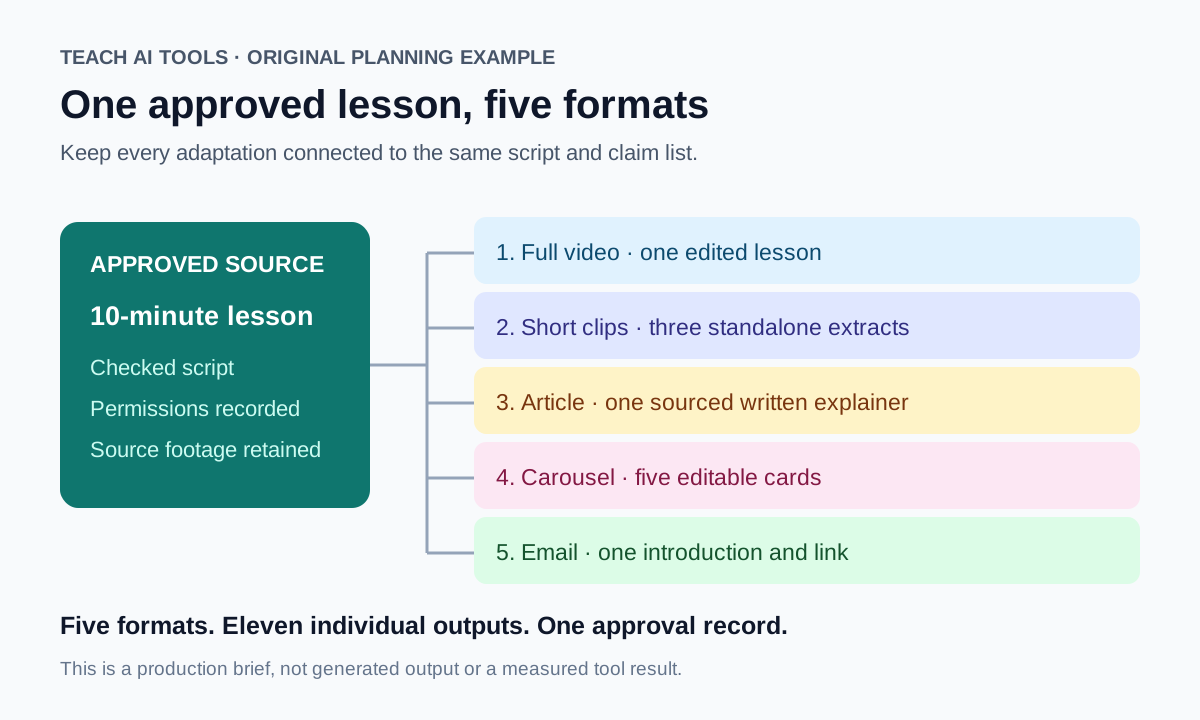
- Lock the approved script and claim list before adapting anything.
- Edit the complete recording and retain the original source.
- Select short passages that preserve their qualifications and context.
- Derive the article and carousel from the approved material; source any additions.
- Write the email last, when the actual published lesson and destination exist.
Keep a common project identifier on every output. If a claim changes in the full lesson, find the related article paragraph, carousel card and email sentence before publishing the update. This is a practical reason to maintain an organised source pack rather than produce unrelated drafts in several dashboards.
Make the upgrade earn its place
Run one representative project before building a larger stack. Record the subscription cost, any extra usage, the review work and the number of outputs you approved. Keep a rejected draft in the record so a failed generation does not disappear from the budget.
A useful cost measure is total production cost divided by approved deliverables. For example, $30 in subscriptions plus two review hours valued at $25 each gives $80. If four deliverables are approved, the illustrative cost is $20 each. Those are chosen planning inputs, not observed savings or evidence that the subscriptions will generate four usable outputs.
Measure the review work that remains: correcting captions, fixing pronunciation, replacing stock scenes and verifying claims. If a tool adds drafts but does not reduce the recurring obstacle, remove it from the next billing cycle. Keep local source files and required exports so changing a subscription does not strand an active project.
Which tools should a beginner start with?
Start with a free CapCut/Canva pilot and a simple calendar, provided those products are available for your device and region. Use your own recordings and narration. Add one paid tool when the pilot identifies a specific requirement; free access is not a promise that every asset or AI feature is included.
Should I buy Descript and OpusClip together?
Only when you need both the spoken-word edit and a separate recurring clip-selection workflow. Test the clipping available in your editor first. The $53 monthly example is a budget for two named plans, not a claim that two subscriptions are always necessary.
Can I use free AI voice output in commercial content?
For ElevenLabs, the checked free-plan documentation permits non-commercial use with attribution; a paid commercial licence is a separate requirement. Review the relevant terms and rights for the voice, source material and generation date before using it in a client or monetised release.
What is the practical verdict?
Choose Descript for a transcript-led editing pilot, OpusClip for recurring shorts, Canva for reusable graphics and ElevenLabs for licensed narration. Shortlist Synthesia or Pictory according to whether you need a presenter or a script-to-video draft. Use Jasper for repeatable brand-guided writing, vidIQ for YouTube planning and Notion for editorial organisation. Buy the smallest combination that completes your actual project and leaves an editable, approved result.