NotebookLM Complete Guide 2026: Google's AI Research Tool That Changes How You Learn
Editorial note: Some links in this article are affiliate links — we may earn a commission if you sign up, at no extra cost to you. Research guides are distinguished from documented firsthand reviews in our editorial standards. Read our editorial standards →
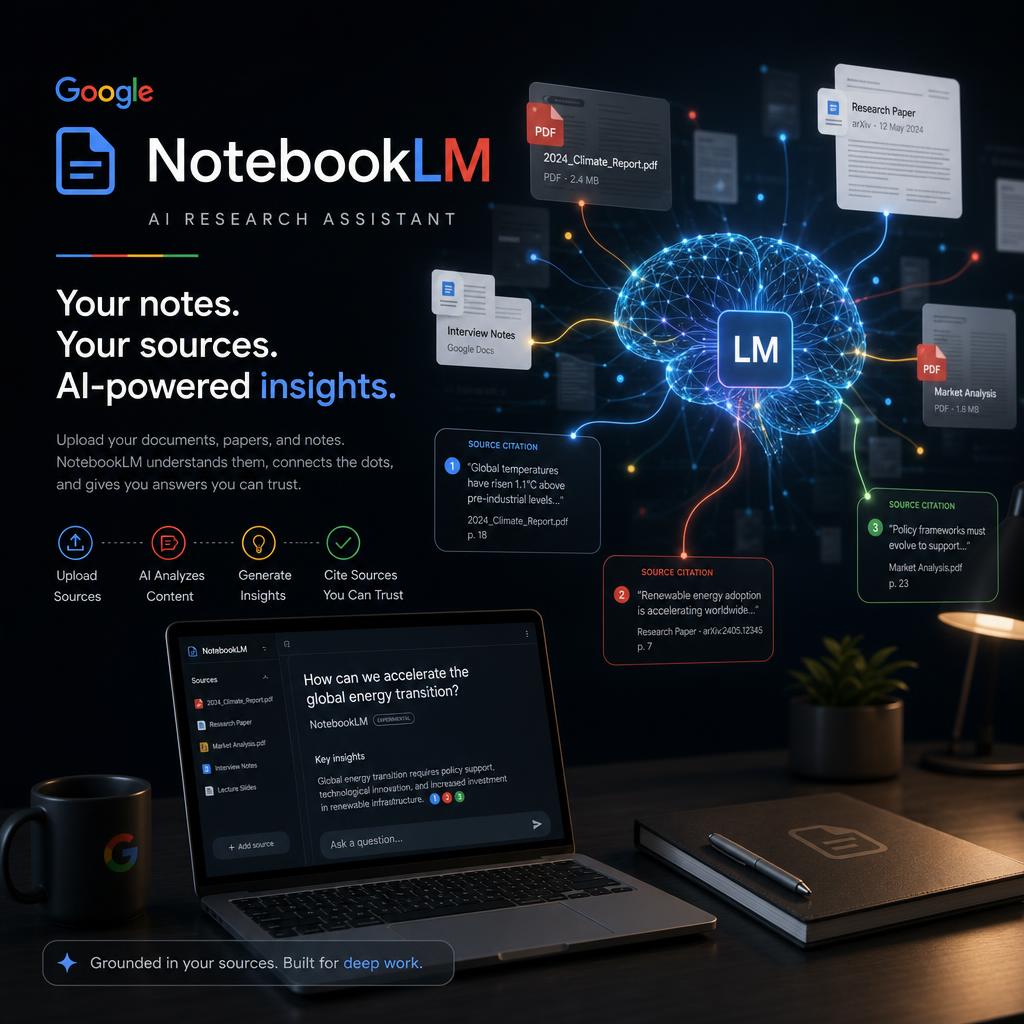
NotebookLM is useful because it starts with a narrower promise than a general chatbot: work with the sources you provide and show where an answer came from. That makes it valuable for studying, research, and project work—but it does not remove the need to judge the quality of those sources.
This guide explains how to set up a practical notebook, which source types work well, and where the product is most helpful compared with a general-purpose AI assistant.
What Is NotebookLM?
NotebookLM is an AI-powered research and note-taking tool made by Google. You create a notebook, upload source material — PDFs, Google Docs, websites, YouTube videos, audio files, or pasted text — and then interact with that content through an AI that is grounded exclusively in what you provided.
When NotebookLM cites a fact, it shows you the exact sentence from the exact source it drew from. If your sources do not contain the answer, the AI says so. This is the opposite of how standard ChatGPT works, and it is why knowledge workers trust it for high-stakes research.
What You Can Upload as Sources
NotebookLM supports a wider variety of sources than most users realize:
Google Docs and Slides — paste a link or connect your Google Drive directly. The notebook syncs if the document updates.
PDFs — upload research papers, legal contracts, financial reports, user manuals. NotebookLM handles dense, technical documents well.
Websites — paste a URL and NotebookLM scrapes and indexes the page. Good for competitor research, documentation pages, news articles.
YouTube videos — paste a YouTube URL and NotebookLM processes the transcript. You can ask questions about video content without watching the whole thing.
Audio files — upload MP3, WAV, and M4A files. NotebookLM transcribes and indexes them. Interviews, lectures, podcast episodes become searchable knowledge.
Pasted text — copy any content directly into a source. Good for email threads, Slack exports, meeting notes.
Each notebook supports up to 50 sources and 25 million words of total content.
The Core Features
Chat With Your Sources
The central feature: ask any question, get an answer grounded in your sources with inline citations. Click a citation to jump to the exact passage.
This is transformatively useful for:
- Legal research — upload a contract and a body of case law, ask "what clauses here conflict with the precedent in these cases?"
- Academic study — upload a textbook chapter, ask "explain the difference between concept A and concept B" and get an answer that maps to specific pages
- Financial analysis — upload an annual report and ask "what does the company identify as its top 3 risk factors?"
- Competitive research — upload competitor documentation and ask "what does their pricing page say about enterprise features?"
Study Guide and FAQ Generation
NotebookLM can generate structured outputs from your sources with one click:
- Study guide — key topics, definitions, and summary for each major concept in your sources
- FAQ — generates the most likely questions readers would ask and answers them from the material
- Briefing doc — an executive summary of all sources combined
- Timeline — extracts chronological events from your sources
These are not generic summaries. They are specific to the exact documents you uploaded, which makes them dramatically more useful for studying than AI-generated overviews from training data.
Audio Overview (The Podcast Feature)
This is the feature that made NotebookLM go viral in 2024. Audio Overview converts your sources into a two-host podcast conversation. Two AI voices discuss your material as if they are two knowledgeable people exploring the topic.
The quality is surprisingly high. The hosts raise points, push back on each other, and make connections between sources. The result sounds like a real podcast — not a text-to-speech reading.
Practical applications:
- Convert a dense research paper into a 10-minute podcast you listen to during your commute
- Create a briefing audio for a meeting you want to prepare for on the go
- Turn a set of onboarding documents into an audio walkthrough for new employees
- Generate an audio summary of a book you uploaded
In 2026, NotebookLM added the ability to customize Audio Overview: you can add instructions before generating ("focus on the methodology section, keep it under 8 minutes, skip background context") and you can interrupt the conversation to steer it live.
Mind Map View
NotebookLM generates a visual mind map of your sources, showing relationships between concepts, people, events, and themes. For visual learners, this is often more useful than text summaries for understanding how ideas connect.
Source Cross-Reference
When you ask a question, NotebookLM can tell you which sources agree, which say something different, and where the gaps are. This is invaluable for literature reviews, legal analysis, and any research where you need to know the weight of evidence.
Best Use Cases by Type of User
Students and Academics
Upload course readings, your own notes, and supplementary material. Before an exam, generate a study guide from all sources combined. Ask the AI to quiz you with questions that require cross-referencing multiple sources.
For thesis research: upload your collected literature and ask "what themes appear across at least three sources?" or "what do these papers disagree on?" This replaces hours of manual synthesis.
Lawyers and Legal Professionals
Upload contracts, precedents, and statutes into a notebook. Ask "does clause 12.4 conflict with the limitation of liability standards in these precedents?" and get a sourced answer in seconds. NotebookLM does not replace legal judgment, but it dramatically accelerates first-pass analysis.
Journalists and Researchers
Upload a data dump — leaked documents, financial filings, FOIA responses — and interrogate it systematically. Ask "what dates are mentioned in documents from the second source set?" or "which documents mention person X and person Y together?"
Business Professionals
Build a competitive intelligence notebook with competitor websites, press releases, and product documentation. Before every strategy meeting, ask "what has changed since my last update?" and "what gaps does our product have based on what competitors offer?"
Podcast and Content Creators
Upload transcripts of your previous episodes or articles, then ask "what topics have I not covered yet?" or "what questions do my listeners ask most often based on these comment exports?"
Tips That Most Users Miss
Name your sources clearly. NotebookLM uses source titles in citations. A source called "Document 1" produces unhelpful citations. Rename sources to descriptive names.
Ask about conflicts explicitly. "Do any of these sources contradict each other on this point?" is one of the most powerful prompts in NotebookLM and most users never use it.
Use Audio Overview as a first-pass review. Listen to the overview before doing a deep read. The AI will highlight the most important points, which tells you where to spend your careful reading time.
Pin your most important notes. You can pin notes in the notebook that the AI considers when generating answers. Pin your key hypotheses or analytical framework so every answer is shaped by them.
Ask for what the sources don't say. "Based on these sources, what question remains unanswered?" is often more valuable than asking for summaries.
Limitations to Know
NotebookLM is not connected to the internet during conversations — it can only reference what you uploaded. If your sources are outdated, so are the answers.
The 25 million word limit is large but not unlimited. Very large document sets (hundreds of books, years of email archives) may require multiple notebooks.
Audio Overview does not let you specify exactly which voice tone or depth to use, though the customization instructions help significantly.
NotebookLM is currently available for free at notebooklm.google.com. A paid tier with higher limits is available through Google Workspace.
The Bottom Line
NotebookLM solves a problem that standard AI tools cannot: reliable, sourced answers from your own material. For research-heavy work — law, academia, journalism, competitive analysis — it is one of the highest-value free tools available in 2026. Build the habit of uploading relevant sources before any important research task, and you will work faster and with more confidence.
Frequently Asked Questions About NotebookLM
Is NotebookLM free to use?
Yes, NotebookLM is free at notebooklm.google.com with a Google account. A paid tier (NotebookLM Plus) is available through Google One AI Premium at $19.99/month, offering longer Audio Overviews, more notebooks, and priority access.
How many documents can I upload to NotebookLM?
NotebookLM supports up to 50 sources per notebook and processes up to 25 million words total. Each source can be up to 500,000 words. Supported formats include PDF, Google Docs, Google Slides, text files, website URLs, YouTube video URLs, and audio files.
What is the NotebookLM Audio Overview feature?
Audio Overview generates a realistic two-host podcast-style conversation about your uploaded documents — complete with natural speech patterns, back-and-forth discussion, and key insight summaries. It typically runs 10-20 minutes and is downloadable as an MP3. It's ideal for absorbing dense research reports or textbooks in audio form.
Does NotebookLM have access to the internet?
No. NotebookLM only uses the sources you upload — it never queries the internet or uses information outside your provided documents. This makes it highly reliable for source-grounded research, since every answer includes a citation you can verify.
How is NotebookLM different from ChatGPT?
ChatGPT answers from its training data (knowledge up to a cutoff date) and can hallucinate facts. NotebookLM only answers from documents you upload, always cites the specific passage it used, and cannot go beyond your provided sources. For research, studying, or analyzing specific documents, NotebookLM is significantly more reliable.
Can NotebookLM process YouTube videos?
Yes — paste a YouTube URL as a source and NotebookLM uses the video's transcript. It works with lectures, conference talks, interviews, and any video with captions. You can then ask questions about the video content, generate summaries, or include it alongside PDFs in the same notebook.
Tags
Written by

Sourabh Gupta
Author at Teach AI Tools
Sourabh Gupta is responsible for Teach AI Tools. Research guides and documented firsthand reviews are identified separately. An author profile is not evidence of testing; look for sources, test records, and limitations in the article.
Full bio & editorial process →